To send gift cards to a remote team, match the card to each person’s country, fund your account, upload your list, and send or schedule. Giftronaut lets you send gift cards to a remote team, and Choice Card recipients pick the brand. The steps below work for virtual gift cards for remote employees in one country or many.
How do you send gift cards to a remote team?
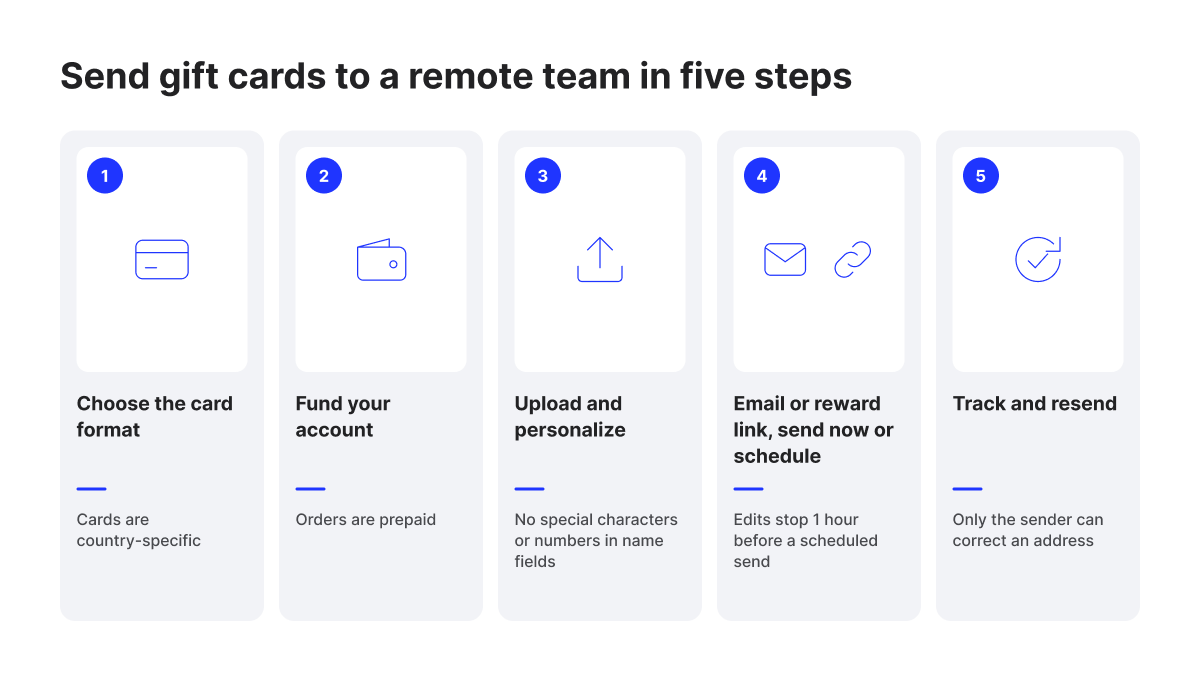
You send gift cards to a remote team in five steps, from choosing the card to tracking delivery. The one rule to plan around is country. On Giftronaut, each gift card works only in the country it was issued for, so the card has to match where each person lives.
- Choose the card format. Match a branded card to each person’s country, or send a Choice Card if locations are mixed or unknown.
- Fund your account. Orders are prepaid, so the balance must cover the order before you place it.
- Add your team and personalize. Enter people one by one or upload a spreadsheet, then add name tokens to the message.
- Choose the channel and timing. Send the reward email from your template, or download links to share through your own tools. Then send now or schedule a date and time.
- Track and resend. Check each order’s status in Order Management and resend any email that bounced or went missing.
Working from home is common in the US. The U.S. Bureau of Labor Statistics’ 2025 American Time Use Survey, released in June 2026, puts a number on it.
On days they worked, 35% of employed people in the US did some or all of their work at home.
Choose a gift card that works where each employee lives
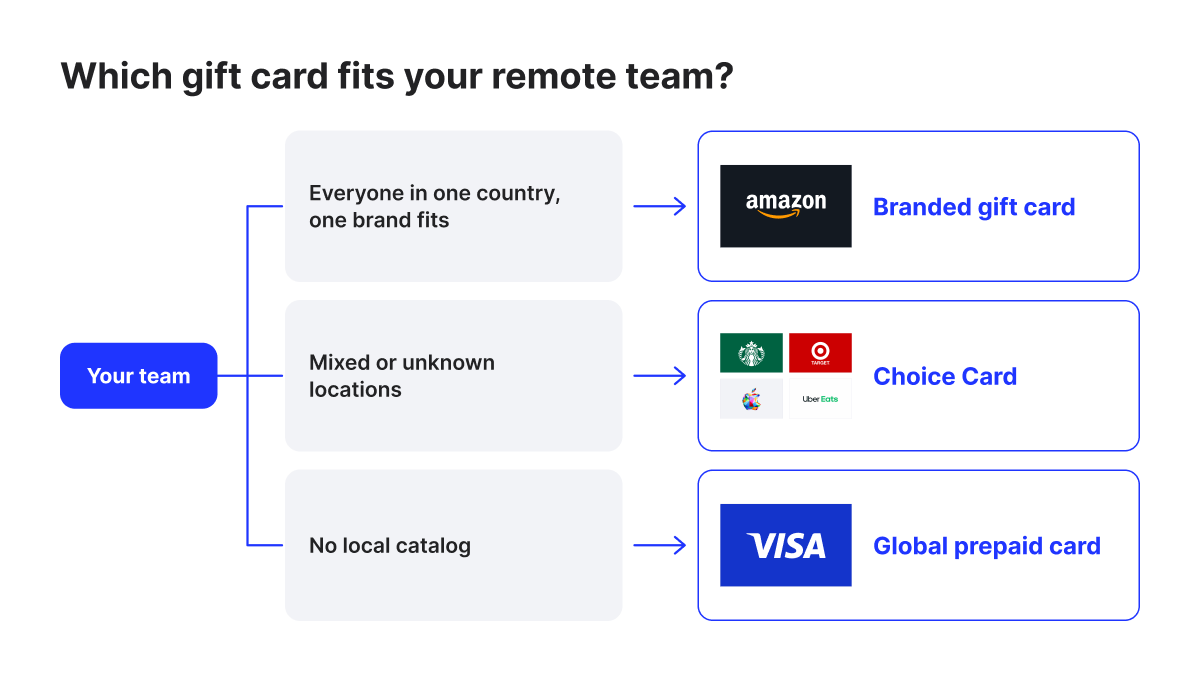
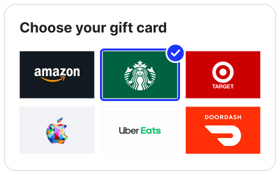
For an international remote team, the card has to match each employee’s country. A gift card issued for one country can’t be redeemed in another, even for the same brand. When you don’t know where everyone is, a Choice Card lets each person select their country when they redeem.
Amazon shows how strict this is. An Amazon.co.uk gift card can’t be redeemed on Amazon.com in the United States. On Giftronaut, 98% of catalog products are listed for a single country and can’t be sent to a recipient anywhere else.
Giftronaut offers local gift cards in 71 countries. Where no local catalog exists, a global prepaid option covers the gap, such as the Global Visa Reward Card or the Swype Global Virtual Mastercard.
Most recipients already get to pick the brand. In Giftronaut order data reviewed in September 2026, 82% of recipients received rewards that let them select the brand themselves.
Which format fits your team
- Choice Card: best when locations are mixed or unknown. Each employee selects a country and currency when they redeem, then a brand from that country’s catalog. You can also send it directly in USD, CAD, GBP, EUR, DKK, AUD, or AED.
- Branded gift card: best when everyone is in one country and one brand suits them all. You select the brand, country, and currency at order time, and they stay fixed.
- Global prepaid card: for an employee in a country with no local catalog, where a card such as the Global Visa Reward Card fills in.
For country-by-country detail, including currencies, read our guide to sending gift cards to employees globally.
See What Employees Receive
Send yourself a sample Choice Card and walk through the same steps your employees will see.
Fund your account before you schedule the send
Giftronaut orders are prepaid, so funds must be posted before you place an order. Credit card funding is the fastest but carries a 3% processing fee. ACH and wire transfers carry no fee but typically take 1 to 5 business days.
Funding methods compared
| Method | When funds are available | Fee |
|---|---|---|
| Credit card | Almost instantly during US business hours; up to 1 business day otherwise | 3% processing fee |
| Wire transfer | Typically 1 to 2 business days after your bank sends it | No fee |
| ACH transfer | Typically 2 to 5 business days after your bank sends it | No fee |
The minimum deposit is $100 USD for every method. Accounts are funded and kept in USD, and recipients can still redeem in supported local currencies. There are no platform fees, contracts, or subscriptions, and the Giftronaut pricing page lists every cost.
Recurring sends need a buffer. For a Smart Order, the balance is deducted 24 hours before each scheduled delivery, and a send isn’t processed if funds are short then. You get an email and a browser push alert when the balance drops too low before an upcoming send.
Upload your team list and personalize it once
Add a few people by hand, or upload one spreadsheet for the whole team. The spreadsheet can carry a different amount for each person. Tokens then personalize every email without editing messages one by one.
You can add First Name, Last Name, Department Name, and Company Name tokens to the subject line and message. Save a default message in your template, and repeat sends start from the same wording. The Help Center guide How to place a one-time order walks through each screen.
For teams that read other languages, AI Translation turns the subject line and message into up to 5 languages per order. You can set each person’s language in the spreadsheet. The limit is 20 translations per customer per day.
To keep the email on-brand, turn on White Label in Settings, Brand Template. Your logo and button color then carry through the email, verification, and redemption pages. As of October 2026, White Label is available as a free trial.
Before you upload, check that:
- name fields contain no numbers and no special characters such as commas, periods, or question marks, which make a recipient invalid;
- every email address is well formed, for example “.com” rather than “,com”;
- the file includes every field your tokens use, such as first and last name;
- each amount falls within the product’s minimum and maximum, since an order outside that range can’t be sent;
- you’ve sent yourself a test email from the preview step, keeping in mind that the gift card in a test email is a sample.
For lists in the hundreds, our guide to sending gift cards to your entire team at once covers bulk upload in more depth.
How to distribute cards to remote teams: email or reward link
Email is the default, and the reward goes out with your template and message. Reward links are the alternative when you want to deliver through your own tools. With links, the design, timing, and deliverability are yours to manage.
Two ways to deliver
| Channel | Who delivers it | Best for | Watch for |
|---|---|---|---|
| Reward email | Sent from Team Giftronaut (no-reply@giftronaut.com) with your template | Teams where you have an email address for everyone | Corporate filters can hold it until IT allowlists the sender |
| Reward links | You, through your own email domain, chat tool, or CRM | Rewards run from your existing systems | Must be enabled on your account; each link is one reward |
With email, each employee gets the reward from Team Giftronaut at no-reply@giftronaut.com. They click the link, confirm their email address through a one-time verification step, and reach the redemption page.
To use links, ask your account rep or support@giftronaut.com to turn the feature on. You then download a ZIP with a CSV of unique links, one per reward, as explained in Downloading a file with reward links. Treat each link as sensitive, because the first person to redeem it uses the reward.
If some employees have no work email, our guide to gift card delivery options for employees without work email compares the alternatives.
Schedule around time zones and recurring moments
Schedule each order for a set date and time, so it lands during working hours where your team is. For birthdays and work anniversaries, a Smart Order sends automatically on each person’s date. You can edit scheduled sends, but not in the final hour.
In a one-time order, choose Send now or Schedule for a specific date and time. You’ll get reminder emails 7 days and 1 day before a scheduled order goes out. To move it, click Reschedule and pick a new time at least 1 hour away.
A Smart Order takes a time zone, a send time, and start and end dates, and it can run for up to 2 years. Upload a spreadsheet with a send date for each person, then set the order live. The Help Center article Setting up a smart order shows each field.
Editing a Smart Order pauses it, and changes apply only to rewards scheduled 24 hours or more ahead. A scheduled order can be canceled until it’s sent. Once it’s fulfilled, it can’t be canceled or refunded.
Planning year-end gifts? Our guide to corporate holiday gift cards for remote employees covers holiday timing.
Track delivery and fix gift card emails that don’t arrive
Order Management shows every order’s status in real time. A weekly Delivery Status Report also lists delivered and bounced counts. If an email goes missing, only the sender can correct the address and resend it.
The report arrives every Tuesday and covers orders sent in the past 7 days, with a link to the portal for resends. In the order itself, “Sent” means the employee’s mail server accepted the email. “Bounced” means the address is invalid or blocked.
Standard orders show per-recipient delivery and bounce status. Redemption status is tracked for orders placed with the Refund Option.
Resending doesn’t reduce your balance or add a charge. But several resends in a short period can trigger spam filters, so find the cause first. The Help Center article Resending & correcting emails has the full steps.
- Wrong or outdated address: the sender opens the order in Order History, clicks the pencil icon, enters the new email, and resends. The employee can’t change it themselves.
- Right address, email not found: the employee checks spam, junk, and Promotions and searches for “Team Giftronaut”. If it isn’t there, the sender selects them in the order and clicks Resend.
- Held by a corporate filter: the employee’s IT team allowlists no-reply@giftronaut.com and the giftronaut.com domain. Then the sender resends.
- Bounced: the sender corrects the address and resends.
- Still missing: the sender contacts Giftronaut support through the chatbox or support@giftronaut.com.
Where Giftronaut fits for a remote team
Giftronaut handles the mixed-location case from one account. With a Choice Card, each employee picks a brand from the gift cards available in their country, out of 4,300+ brands in total. Giftronaut reaches 225 countries through local gift cards and global prepaid options, depending on each person’s location.
There are no platform fees, contracts, or subscriptions. EMS Consulting needed to send incentives to international recipients. Its results were 100% international reach, 99% recipient satisfaction, and 2.5x recipient engagement.
Run the first send small, then repeat it
Start with a test email to yourself, then send to one team before the whole company. Once an order works, clone it for the next send instead of starting over. Our checklist of what you need to run a gifting campaign covers the rest of the setup.
Set Up Remote Employee Rewards
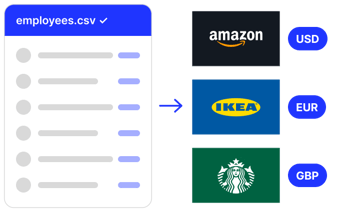
See how HR teams upload one list and give each employee a reward in their own currency.
Frequently Asked Questions
Can I send gift cards to remote employees in different countries in one order?
Yes, with a Choice Card. Each employee selects their country and currency when they redeem, then a brand from that country’s catalog. A branded gift card order uses the one brand, country, and currency you set at order time.
Can I schedule gift cards to arrive on a specific date, like a birthday?
Yes. You can schedule a one-time order for a specific date and time, and a Smart Order sends on each person’s date, such as a birthday. Scheduled sends can be edited until 1 hour before they go out.
What should I do if a remote employee says the gift card email never arrived?
Ask them to check spam, junk, and Promotions. If it isn’t there, resend it from Order History at no extra charge. If a corporate filter is holding it, their IT team can allowlist no-reply@giftronaut.com and the giftronaut.com domain.
Does Giftronaut charge fees to send gift cards to a remote team?
No platform fees, contracts, or subscriptions. Credit card funding carries a 3% processing fee, and ACH and wire funding are free.
Can I see what my employees will receive before I send?
Yes. Send yourself a sample Choice Card and walk through the same steps your employees will. The sample is for demonstration only and can’t be redeemed for value.