A virtual prepaid Mastercard is a Mastercard that exists only as digital card details, loaded with a fixed amount before anyone spends it. To send one as a reward, you choose the card and the amount and deliver it by email, text or reward link; the recipient clicks the link, the card number is created on the spot, and they spend it online wherever Mastercard is accepted, in 202 countries for Giftronaut’s Swype Global Mastercard.
The first time I spent a week in a city I didn’t know, I loaded a transit card at the station machine with enough for the whole trip. It worked on every bus and every train. Then, on the last morning, the gate to the airport train turned red. The attendant glanced at the card and said, “That one’s for the city. The airport line is a different company.” I bought a second ticket with my suitcase leaning on my leg.
A virtual prepaid Mastercard gets the same reaction from senders. The logo says it’ll work almost anywhere, and mostly it does, right up until a recipient reaches the one gate it doesn’t open. Here’s what the card is, how to send it as a reward, and which gates to check before it goes out.
What is a virtual prepaid Mastercard?
A virtual prepaid Mastercard is a payment card with no plastic: the recipient gets card details instead of a card, and the money on it is loaded before it’s issued. Because it runs on the Mastercard network, it’s accepted by merchants that take Mastercard, within the limits its issuer sets.
Each word in the name tells a sender something useful:
- Virtual means nothing gets shipped. The recipient opens a link and gets the card details.
- Prepaid means the balance is fixed when the card is issued. The recipient can’t overspend it, and nobody is lending them money.
- Mastercard names the network, which decides most of the places the card is accepted. The issuer’s own rules decide the rest: which countries, which kinds of purchase, and what it costs to use.
On Giftronaut, the Mastercard you can send to recipients around the world is the Swype Global Virtual Mastercard (Swype Global Mastercard for short). It’s issued in US dollars, it’s single-load, and it closes once the balance reaches zero. Recipients in Canada have a local option too: Giftronaut’s prepaid card page lists a Canada Mastercard in Canadian dollars that works only in Canada, with no recipient fees and a one-year expiry.
If you’re still deciding whether a prepaid card suits your reward at all, our guide to virtual prepaid cards covers how they work and which one fits each recipient.
How do you send a virtual prepaid Mastercard as a reward?
To send a prepaid Mastercard as a reward, you fund your account, pick the card and an amount for each recipient, and choose how it’s delivered. One order can reach one person or a full spreadsheet of them.
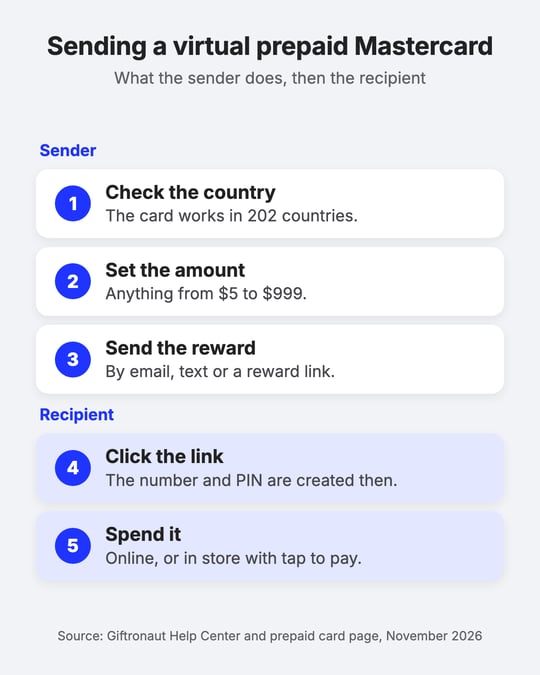
Here’s the sender’s side, step by step:
- Fund the account. A Giftronaut account is funded in US dollars before any order goes out. ACH and wire deposits carry no fee, a credit card deposit carries a 3% processing fee, and the minimum deposit is $100.
- Check each recipient’s country. The Swype Global Mastercard works in 202 countries, so confirm every recipient lives in one of them before you add them to the order (more on countries below).
- Set the amount. The card takes any value from $5 to $999. Every purchase the recipient makes has to fit inside that balance, because the card can’t be topped up later.
- Choose the delivery. Send by email to recipients anywhere, by text message to US and Canadian mobile numbers, or as reward links you download and share in your own channel without uploading anyone’s details. You can send right away or schedule the order for a later date.
One more check if the recipients are your employees: the IRS says gift cards and other cash equivalents are never excludable as a de minimis benefit, however small the amount (IRS Publication 15-B, 2026). A prepaid card for an employee usually runs through payroll, so talk to your payroll team before the order goes out.
Ordering for a large team? Our guide to bulk prepaid Visa and Mastercard gift cards covers the ordering side at that scale.
How does the recipient get the card?
The recipient gets their prepaid Mastercard by opening the reward message and clicking its redemption link, which is the moment the card is created. Until that click, there’s no card number for anyone to copy or use.
From the recipient’s side, it goes like this:
- The reward arrives. By email, it comes from Team Giftronaut (no-reply@giftronaut.com). By text, it reaches a US or Canadian mobile number. With a reward link, it arrives however you chose to share it.
- They confirm it’s them. For an email or text reward, a one-time code goes out the same way, and it’s valid for 10 minutes. If it expires, they can ask for a new one.
- The card is created. A Giftronaut prepaid card’s number and PIN are generated when the recipient clicks the redemption link, so the card can’t have been used by anyone before that point.
- They activate it with the issuer. The Swype card has its own short activation steps on the issuer’s site. Our Swype Global Mastercard guide walks through each screen, along with the card’s full fee table and activation window.
Work email is the usual snag: corporate security filters sometimes hold reward emails. If a recipient says nothing arrived, ask their IT team to allowlist no-reply@giftronaut.com and the giftronaut.com domain.
Which countries can receive a Swype Global Mastercard?
The Swype Global Mastercard can be used in 202 countries, which covers most of the 225 countries Giftronaut reaches but not all of them. Check that each recipient lives in one of those 202, and plan another reward for anyone who doesn’t.
The gaps fall into two groups:
- Countries under US sanctions. The card can’t be used in them, and Giftronaut blocks access from 12 sanctioned countries altogether, for senders and recipients alike.
- Countries where another global card is the route. Saudi Arabia is one example: it has no local product in Giftronaut’s catalog, so senders with Saudi recipients are routed to the Global Visa Reward Card and PayPal International instead. The Swype Global Mastercard guide lists the countries and territories where the card is declined.
Currency is the other part of the country question. The card is issued in US dollars, and purchases in another currency are converted automatically at the prevailing exchange rate. Each purchase made outside the United States also carries a fee of $0.50 plus 1.5% of the amount. Take a recipient abroad who spends $50 of the card at a local shop: the fee is $1.25, so that purchase uses $51.25 of the balance.
Where can recipients use a virtual prepaid Mastercard?
Recipients can use the Swype Global Mastercard online wherever Mastercard is accepted, in any of its 202 countries. In stores, it works where the merchant accepts tap to pay or can key in the card details by hand, so a phone wallet is the usual route.
| Where | Does it work? |
|---|---|
| Online checkouts that take Mastercard | Yes, worldwide outside restricted countries |
| In store | Yes, with tap to pay or manual card entry |
| Apple Pay and Google Pay | Yes, the card can be added for tap to pay |
| ATMs | No |
| Peer-to-peer apps such as Venmo | No |
Giftronaut’s prepaid card page lists Apple Pay and Google Pay support for its global cards, the Mastercard included. If a recipient hasn’t added a virtual card to a phone wallet before, our guide to the virtual prepaid card for Apple Pay walks through the setup and what to do if Wallet won’t accept a card.
The ATM line matters more than it looks: a recipient who thinks of the card as cash tries a cash machine first, and a decline on day one sours the reward.
Giftronaut’s prepaid cards are digital only; if you’re weighing plastic instead, see our comparison of virtual and physical cards.
How long does the Swype Global Mastercard last?
The Swype Global Mastercard is valid for up to three years from issue, or until 90 days after its last use, whichever comes first. In practice, the 90-day rule is the one recipients run into: a card used once in mid-March and then forgotten can expire by mid-June.
That timing shapes a few sender decisions:
- Mention the 90 days in the reward message. A recipient who knows the card expires after a quiet spell will spend the last few dollars instead of saving them for later.
- The card can’t be reloaded. It’s single-load, so when the balance reaches zero, the card closes. A second reward means a second card.
- Unclaimed rewards are a separate case. If a recipient never clicks the link, Giftronaut’s Refund Option, chosen when you place the order, pays back 50%, 40% or 30% of fully unredeemed rewards for a 30-, 60- or 90-day redemption window. It doesn’t apply once a card has been redeemed, even partly.
Virtual prepaid Mastercard or Visa reward card: which fits?
The Swype Global Mastercard fits best when a reward is larger than $500, when recipients shop mostly online, or when they’re likely to spend it slowly. The Global Visa Reward Card fits recipients who want to pay in shops and by phone, and it reaches a few more countries.
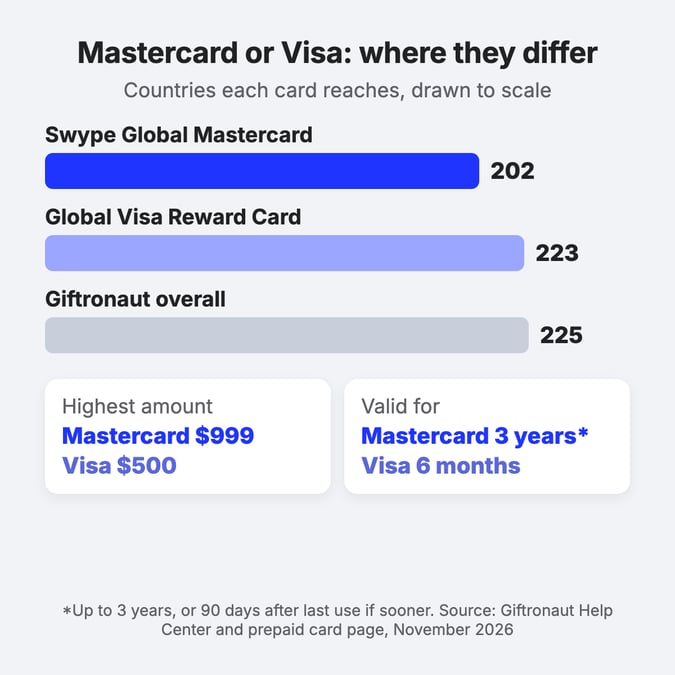
The Swype Global Mastercard reaches 202 countries, takes up to $999 and lasts up to three years (or 90 days after last use). The Global Visa Reward Card reaches 223 countries and works online, in store and by phone, but it tops out at $500, expires six months after issue, and charges 6% on purchases in a currency other than US dollars.
For the full side-by-side of every prepaid card Giftronaut sends, including the US and Canada Visa cards, our virtual prepaid card guide has the tables. And for a group spread across countries, a Choice Card skips the choice altogether: each recipient selects their country at redemption and picks from what’s available there, which can include global options such as the Swype Global Virtual Mastercard.
What should the reward message say?
The reward message should tell recipients the four things the card won’t tell them at checkout: where it works, where it doesn’t, what it costs abroad and when it expires. Each takes one sentence.
A message that covers it might read:
“Thanks for this quarter. This is a $100 prepaid Mastercard you can use online anywhere Mastercard is accepted, or in store by adding it to Apple Pay or Google Pay. It won’t work at ATMs or on Venmo. Purchases outside the US carry a small fee ($0.50 plus 1.5%). The card expires 90 days after you last use it, so spend the balance when you can.”
Swap in your own amount and tone, but keep the four facts.
How Giftronaut sends virtual prepaid Mastercards
Giftronaut sends prepaid Visa and Mastercard rewards and gift cards from 4,300+ brands on one platform, reaching recipients in 225 countries. For a prepaid Mastercard program, that covers:
- The right Mastercard by country. The Swype Global Mastercard in its 202 countries, the Canada Mastercard for Canadian recipients, or a Choice Card so each person picks.
- Your brand on the reward. Add your logo, a personal note and your company colors to the reward template.
- One card or thousands. Upload a spreadsheet, set each amount and send by email, text or reward link, with no minimum order.
- Clear costs. No platform fees: you pay the face value of the cards you send, plus 3% only if you fund by credit card.
Before you send the first card
I still load a transit card when I travel. Now, before I tap it on anything, I ask the person at the ticket window one question: “Does this get me to the airport?” Nobody at a ticket window has ever minded.
For your first order, ask the same kind of question of each recipient: which country they live in, and whether they’ll spend it online or in a shop. Send the Swype Global Mastercard to the ones it fits, put the 90-day rule and the no-ATM line in the message, and give everyone else a Choice Card.
Frequently Asked Questions
Can you use a virtual prepaid Mastercard outside the US?
Yes. Giftronaut’s Swype Global Mastercard can be used in 202 countries, but not in countries under US sanctions. Each purchase made outside the United States costs $0.50 plus 1.5% of the amount.
Can I add a prepaid Mastercard to Apple Pay or Google Pay?
Yes. Giftronaut’s prepaid card page lists Apple Pay and Google Pay support for its global cards, the Swype Global Mastercard included. In stores, the card then works wherever the merchant accepts tap to pay.
How long does a virtual prepaid Mastercard last?
The Swype Global Mastercard is valid for up to three years from issue. It expires sooner if 90 days pass after its last use.
Can a virtual prepaid Mastercard be reloaded?
No. The Swype Global Mastercard is single-load, and it closes once the balance reaches zero. To send more, send a new card.
How does a recipient check the balance on a Swype card?
The recipient returns to the original reward email and follows its link. That page shows the remaining balance and the card’s transaction history.
What is the most I can load on one prepaid Mastercard reward?
The Swype Global Mastercard takes any value from $5 to $999 per card. For a larger reward, send more than one card or choose a different reward.