
Businesses can buy Swype cards through Giftronaut and send them by email to recipients in 202 countries.
The Swype card, officially the Swype Global Mastercard, is a digital prepaid card your recipients can spend online, in store, or through mobile wallets. So one card works for a remote team or a client list spread across many countries.
What is a Swype card?

The Swype card (Swype Global Mastercard) is a fully digital, single-load prepaid card that can be used anywhere Mastercard is accepted, including internationally.
Unlike a gift card tied to a single store, it isn’t limited to one brand. If your recipients would rather have Visa, see our guide to international Visa gift cards.
Recipients can use the card for everything from daily essentials to online shopping. They can also add it to Apple Wallet or Google Wallet to pay with a tap.
Top features of the Swype Mastercard
Swype is built for secure, flexible use, wherever your recipients are in the world. Here are some key features that set it apart:
- Fraud monitoring & real-time alerts powered by Mastercard
- Mobile wallet compatibility for Apple Wallet and Google Wallet
- Digital delivery by email with no shipping delays
- Secure dashboard access with 2FA and full card control
- USD-based card that can be used across borders
Why companies like Swype
Swype is simple for recipients, and it saves the sender work too.
- Global flexibility: works in 202 countries for a wide range of use cases.
- No physical cards: Say goodbye to lost cards, delayed mail, or damaged packaging.
- Streamlined delivery: send in bulk by spreadsheet upload or API.
- Custom branding & messages: Personalize each reward to match your company’s tone.
- Effortless tracking: Real-time dashboard keeps you in the loop on delivery, redemption, and balance activity.
Where to buy Swype cards
Buying a prepaid card is one thing; sending it efficiently and keeping track of it is another. That’s where Giftronaut makes all the difference.
With Giftronaut, you can order individual cards for one-off rewards or upload a simple spreadsheet to send rewards in bulk. Each reward is delivered by email, and our dashboard lets you manage orders and track delivery all in one place.
Not sure whether Mastercard or Visa suits your list? Our bulk prepaid card guide compares the two.
Why Giftronaut?
- No platform fees: no contracts or subscriptions. Credit card funding carries a processing fee; ACH and wire funding are free.
- Global email delivery: cards arrive in the recipient’s inbox and can be used in 202 countries (see the restricted list below).
- Custom templates and messaging: each reward email can be customized with your company’s branding and a message for a truly personalized experience.
Send Swype Cards in Bulk
Upload one spreadsheet to send Swype cards by email to recipients in 202 countries.
How to redeem your Swype Mastercard
Redeeming a Swype Mastercard is simple and straightforward. Here’s a step-by-step guide to help you through the process:
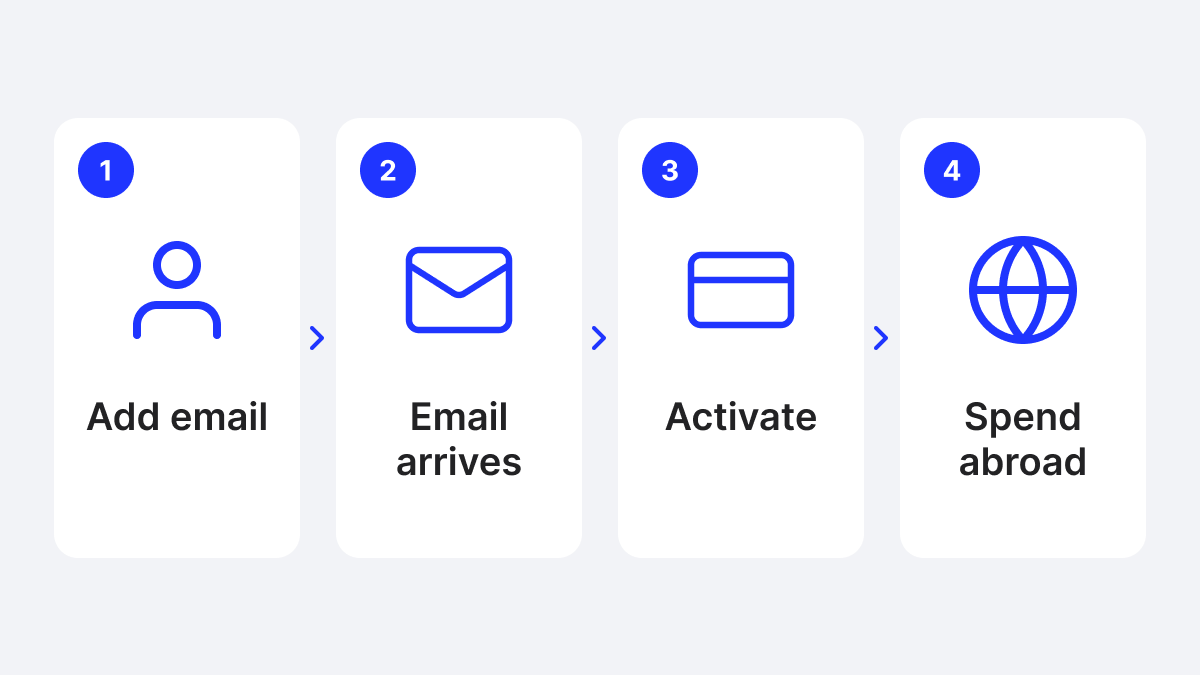
1. Click “Redeem Your Gift Card” in your email
This will take you to a landing page with a summary of your reward. Simply click “Checkout”, and you’ll be redirected to the Swype site.
2. Register your card
Fill out the required details, including your name and billing address. Note that the address field must not exceed 30 characters.

3. Activate your card
After submitting the form, you’ll see an “Activate” button. Click it to begin the activation process and link the card to your email address.
4. Create a Swype account
Provide your email to create a Swype account and receive your card credentials securely. This ensures you’ll have access to your dashboard and future updates.

5. Verify your account
Check your inbox for an email from Swype Cards, and enter the 6-digit verification code when prompted to complete the sign-in process.

6. Access your Swype dashboard
Once verified, you’ll be directed to the Swype dashboard. From here, you can:
- View your full card details: card number, expiration date, CVV, available balance, and recent transactions.
- Find clear instructions on how to add your card to Apple Wallet or Google Wallet, so you can make purchases in-store with just a tap.

Important information to keep in mind
To ensure a smooth experience with the Swype Mastercard, keep these key points in mind:
1. Non-reloadable
Once the balance is used, the card cannot be reloaded and will expire.
2. Balance Limitations
Be sure your total purchase (including tax and fees) does not exceed the available balance to avoid declined transactions.
3. VPN Restrictions
Avoid using a VPN when activating or using your card, as it may trigger fraud detection and block transactions.
Where can I use the Swype Mastercard?
The Swype Global Mastercard can be used anywhere Mastercard is accepted: online retailers, supermarkets, restaurants, and in-store via mobile wallet.
Full list of restricted countries and territories
Swype Global Mastercards will be declined if the merchant is located in, or the transaction is routed through, any of the regions below.
-
Asia & Middle East
Afghanistan, Iran, Iraq, Syria, Lebanon, Saudi Arabia, Yemen, North Korea (DPRK), Myanmar (Burma), Palestine (West Bank/Gaza) -
Africa
Central African Republic, South Africa, Democratic Republic of the Congo, Ethiopia, Libya, Mali, Somalia, South Sudan, Sudan, Zimbabwe -
Europe & Eurasia
Albania, Bosnia and Herzegovina, Serbia, Montenegro, Croatia, Belarus, Russia (Russian Federation), Ukraine (including Crimea, Donetsk, and Luhansk), Turkey (Türkiye) -
Latin America & Caribbean
Cuba, Nicaragua, Venezuela
Attempting to transact in these locations may trigger an automatic block or lead to card suspension.
Swype Mastercard fees and expiration
It’s important to stay informed about any fees or expiration rules so you and your recipients can get full value from the Swype Global Mastercard.
Here’s what you need to know:
| Fee Type | Details |
|---|---|
| Domestic U.S. transactions | A $0.10 flat fee applies to any domestic transaction. |
| International transactions |
A $0.50 flat fee applies to any purchase made outside the United States. A 1.5% value fee is applied to the transaction amount.
|
| Inactivity fee | After two months of no activity, a $2.50 maintenance fee is deducted each month. |
| Card Expiration |
The card remains valid for up to three years from the issue date and will expire ninety (90) days after the last activity, whichever occurs first. Any unused funds will be forfeited upon expiration. |
| Activation window |
Your secure activation link is live for 60 days from the date it is generated. Make sure you activate the card before the link lapses! |
Sending only to the US or Canada?
Swype is built for spending across borders. If your recipients all live in Canada, compare the local options in our guide to prepaid cards for Canada.
Every card has its own fee rules. For Visa cards with no fees, see our no-fee Visa gift card guide.
Not Sure?
Try a Choice Card
Recipients choose from 4,300+ brands in 225 countries, in their own currency.

Frequently Asked Questions
Can I use this card internationally?
Yes, online or in-store (via mobile wallet) anywhere Mastercard is accepted, except restricted regions.
Is it a physical or digital card?
It’s entirely digital. Add it to Apple Wallet or Google Wallet for in-store purchases.
How do I add it to my mobile wallet?
Manually enter the card number, expiry, and CVV into Apple Wallet or Google Wallet. You will be required to enter your email address to receive a verification code. Alternatively, the Swype.Cards dashboard has buttons to directly add the card to Apple Wallet or Google Wallet.
Is the card reloadable?
No, Swype Mastercards are single-load. Once the balance is spent, the card closes.
What currency is the card issued in?
All Swype Mastercards are issued in USD. If used in a different currency, a flat foreign transaction fee of $0.50 USD will apply.
Do Swype Mastercards expire?
They expire up to 3 years from issuance or 90 days after the last activity, whichever comes first. Unused funds are forfeited at expiration. Be sure to activate and use your card within that time frame to avoid losing any funds.
Are there any tips for avoiding declined transactions?
Check your balance first, avoid restricted regions, don’t use a VPN, and plan for gratuity holds.