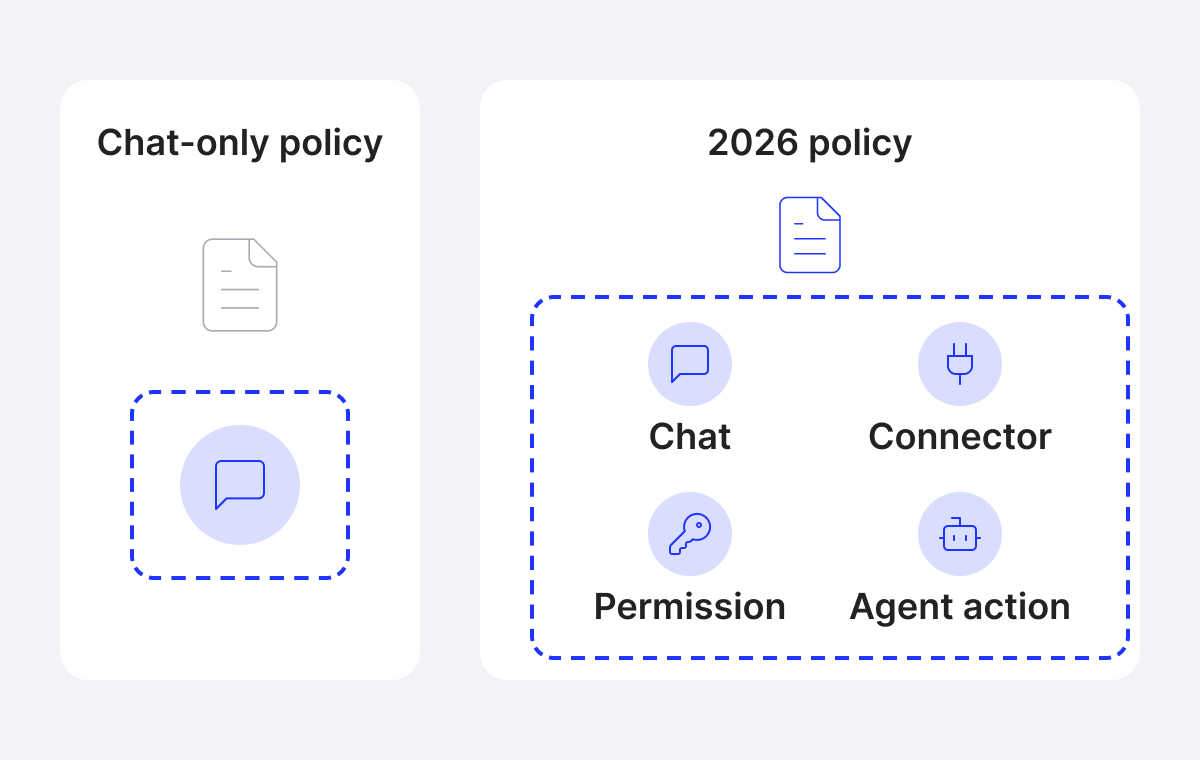
An AI acceptable use policy for employees defines which AI tools employees can use, what information they can share, and who is responsible for reviewing AI-generated output. In 2026, it should also address AI connectors and the permissions employees grant these tools.
If you're in HR or People Ops and preparing your 2027 employee handbook, the nine clauses below are a good starting point. Pay particular attention to clauses 4 and 5, which cover connectors and vendor approval. These are often overlooked in policies originally written for AI chatbots.
If your company doesn't have a dedicated IT team, the person responsible for managing your software accounts can handle the IT-related steps outlined below.
What should an AI acceptable use policy for employees include?
An AI acceptable use policy for employees should cover nine key areas, from defining its scope to establishing a regular review schedule. Each clause addresses a practical question employees may have about using AI at work.
An effective policy gives employees clear guidance rather than simply listing what they cannot do. Whether you call it an AI acceptable use policy or a generative AI policy for employees, the same nine principles apply.
| Clause | The employee’s question | What the clause sets |
|---|---|---|
| 1. Scope | Does this cover the tool I’m using? | Chat assistants, browser extensions, agents, and AI features turned on inside software you already use |
| 2. Approved tools and accounts | Which tools can I use, and on which account? | A named list of tools, used with company accounts only |
| 3. Data rules | What can I put in? | Which data classes go into which tools, and a ban on credentials everywhere |
| 4. Connectors and agents | Can I connect an AI tool to my email, files, or apps? | IT approval, the least access needed, and a person’s sign-off before an AI tool sends, pays, deletes, or publishes |
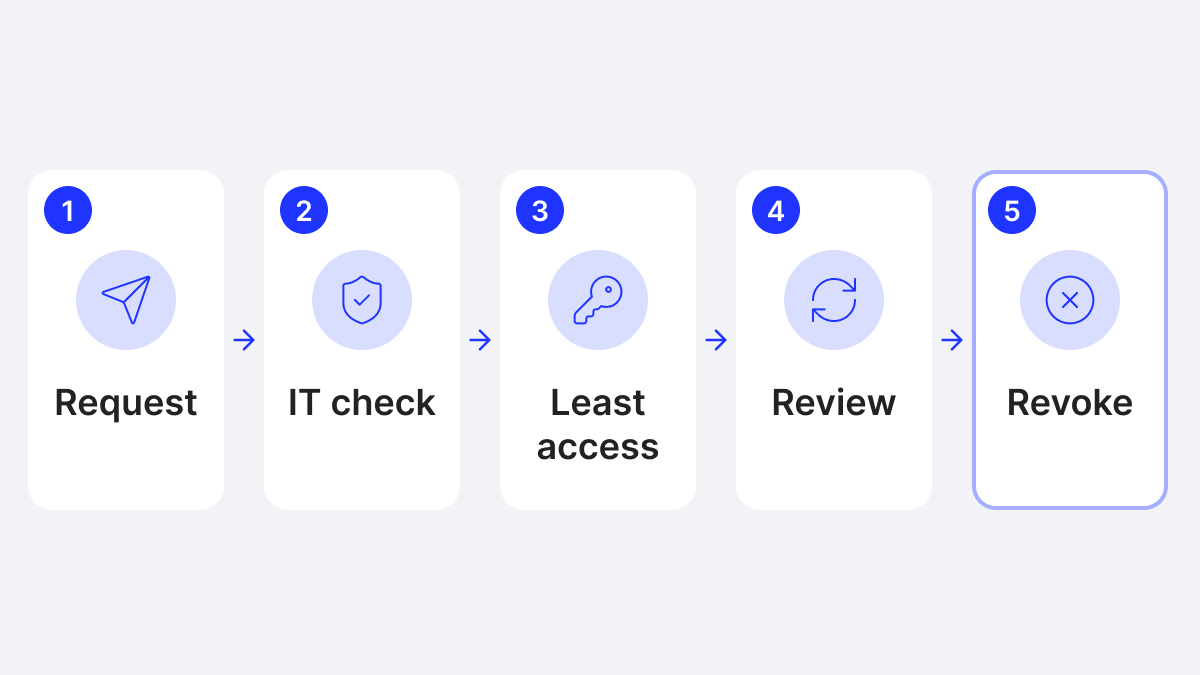
| 5. Vendor approval | How does a new tool get approved? | A request path and the checks IT runs before adding a tool |
| 6. Output review | Who checks what the AI produced? | The employee who uses the output owns its accuracy |
| 7. Disclosure | When do I say I used AI? | Which kinds of work need a note that AI helped |
| 8. Reporting mistakes | What if I pasted something I shouldn’t have? | Who to tell, how fast, and no penalty for reporting your own mistake |
| 9. Review cycle | When does this policy change? | One owner, and how often the tool list and the policy are reviewed |
Why older AI policies miss connectors and account permissions
Many earlier AI policies focused primarily on the information employees entered into chatbots. However, three security incidents disclosed in 2026 illustrate how AI-related risks can extend beyond the chat window. Each highlights a potential gap in policies designed solely around chatbot usage.
Vercel’s April 2026 bulletin says its incident began with a compromise of Context.ai, an AI tool one employee used. The Register quoted Context.ai’s own bulletin in April 2026. That bulletin says it appears at least one Vercel employee signed up with a Vercel enterprise account and granted “Allow All” permissions.
The attacker then took over the employee’s Google Workspace account, Vercel says. This incident highlights the importance of requiring IT approval before granting AI tools access to company accounts and prohibiting unrestricted account permissions.
In November 2026, The Record reported that German web host Mittwald was breached through a flaw in its MCP server. Customers used that server to connect their AI assistants to Mittwald’s hosting platform. Attackers compromised 56 customer projects and went undetected for eight days. Assign a designated owner to every AI connector and review its security regularly, including connectors provided by third-party vendors.
On November 21, 2026, Together AI disclosed that an AI coding agent had committed a credential while working on one of its public code repositories. An unauthorized party used it to download stored samples of customer prompts from June and July 2026. The party then searched those samples for credentials to other services.
Under the policy, credentials never go into any AI tool. IT also asks every vendor how long it keeps inputs.
Which AI tools and accounts can employees use?
Employees should use only approved AI tools and access them through company accounts. Personal and free accounts should not be used to process company data. Establish a clear approval process with a defined response time so employees can request new tools rather than bypassing company policies.
In 2024, Microsoft and LinkedIn’s Work Trend Index surveyed 31,000 people across 31 countries. It found that 78% of AI users were bringing their own AI tools to work.
An AI tool register gives employees a central reference for checking which tools are approved and how they can be used. IT should maintain an up-to-date entry for each tool and make the register accessible to everyone.
| Register field | What it records | Illustrative entry |
|---|---|---|
| Tool and plan | The product and the plan your company pays for | AI assistant, business plan |
| Account type | Which sign-in employees use | Company account only |
| Data allowed | The highest data class the tool can receive | Internal and confidential |
| Connectors allowed | Which apps the tool can reach, through which client, and at what access level | Read-only access to the shared drive |
| Owner and review | Who approves changes and when the entry is next checked | IT lead, every quarter |
Simply listing approved applications is not enough. Your register should also document how those applications connect to other systems. This is where the connector permissions outlined in clause 4 become particularly important.
What data should employees never put into AI tools?
Employees should never share passwords, API keys, or other login credentials with AI tools. Confidential and restricted information should only be processed using tools specifically approved to handle those data classifications.
Rather than creating a separate classification system for AI usage, build on your company's existing data classification framework.
- Public: material already published, such as a job posting or a press release. Any approved tool.
- Internal: org charts, meeting notes, and internal how-to documents. Approved tools on company accounts.
- Confidential: client contracts, pricing, and unreleased plans. Only tools approved for confidential data.
- Restricted: employee pay, health, and ID records, and other regulated personal data. Only a tool approved for restricted data, and none by default.
The rule covers files, screenshots, meeting recordings, and anything a connector pulls in, along with typed prompts. Where a vendor offers zero data retention, turn it on for tools approved for confidential data. In its November 2026 notice, Together AI said it made zero data retention the default for new accounts.
Rules for AI connectors, agents, and MCP servers
Employees must obtain IT approval before connecting AI tools to company email accounts, files, calendars, or business applications. Each approved connection should have a designated owner and only the permissions necessary for its intended purpose. Actions such as sending messages, making payments, deleting records, or publishing content should require human approval.
Connectors include browser extensions, agents, and MCP servers. As of November 2026, the Model Context Protocol documentation describes MCP as an open-source standard for connecting AI applications to external systems. Treat all of them the same way in the policy:
- Limit access to what is necessary. Start with read-only permissions and grant write access only when required. Avoid unrestricted account permissions.
- Assign a designated owner. Each connection should have an owner who understands its permissions and can respond to IT inquiries.
- Require human approval. Employees should review and approve AI actions that send messages, make payments, delete records, or publish content.
- Revoke access when it is no longer needed. IT should remove connections when a tool is retired or an employee leaves the company.
- Conduct regular access reviews. Establish a consistent schedule for reviewing connected applications, such as quarterly.
Connectors also differ in where they run, so the register entry names the client as well as the vendor. Giftronaut MCP, for example, works only from local MCP clients such as Claude Code or Cursor. Web connectors such as ChatGPT and Claude on the web aren’t supported.
If your policy names AI connectors, it helps to know what they are: our plain-English guide to MCP vs API explains which one lets an assistant act on a person’s request.

What to check before approving an AI tool or vendor
Before approving an AI tool or vendor, check the account permissions it requests, how long it keeps inputs, and how connector access is revoked. Also check whether actions need a person’s approval and whether its SOC 2 Type II report covers the AI features.
Start by reviewing the permissions the tool requires and whether administrators can restrict them. Next, find out what information the vendor retains, how long it is stored, and whether data retention can be disabled.
If the tool supports connectors, check which systems and information it can access and how those permissions can be revoked. Determine whether the tool can perform actions independently and whether administrators can require human approval before those actions are carried out.
Finally, request the vendor's SOC 2 Type II report and confirm whether its AI features fall within the scope of the audit. On October 28, 2026, the AICPA proposed revised SOC 2 Trust Services Criteria, the Journal of Accountancy reported.
The proposed changes address AI governance, prompt manipulation, and automated decision-making, but they are not yet final. Ask the vendor to confirm which AI features its current SOC 2 Type II report covers rather than assuming they are included.
Rewards platforms go through the same review. For example, a rewards vendor like Giftronaut lets teams send gift cards from the portal, by spreadsheet, through the Giftronaut API (in Beta), or from a local MCP client. For a rewards API, add the questions in our gift card API provider checklist.
Check your current AI policy against 9 questions
Use the following nine questions to assess your existing AI policy. Each corresponds to one of the nine clauses outlined above. If you answer no to any of them, that section may need to be added or updated before your 2027 employee handbook is finalized.
- Does the scope name chat tools, agents, browser extensions, and AI features inside software you already use?
- Are the approved tools named, with company accounts required for work?
- Does it say which data classes go into which tools, and ban credentials everywhere?
- Is IT approval required for every AI connector, with a person’s sign-off before an AI tool sends, pays, deletes, or publishes?
- Does it give a request path and list the checks a new tool or vendor must pass?
- Is the employee who uses AI output responsible for its accuracy?
- Does it say when employees note that AI helped with their work?
- Can employees report their own mistake without a penalty, and do they know how?
- Does it name one owner and a review cycle for the policy and the tool register?
Keeping the AI policy current as tools change
Your approved AI tool register will likely need more frequent updates than the policy itself. Review it whenever an employee requests a new connector, leaves the company, or when an approved vendor discloses an AI-related security incident.
Establish a regular schedule for reviewing the full policy, with HR and legal reviewing each revision before it is distributed. Ask employees to acknowledge the updated policy as part of the rollout.
If your current policy was written primarily for chatbot usage, start by adding clauses 4 and 5 to address connector permissions and vendor approval.
Finally, add your next AI policy review date to your 2027 HR calendar alongside existing payroll deadlines and compliance requirements. Having a scheduled review helps ensure your policy keeps pace with the tools employees actually use.
Frequently Asked Questions
Can employees use personal ChatGPT or Claude accounts for work?
Employees should only use AI tools and company accounts listed in the approved tool register when handling work-related information. Personal accounts should be reserved for personal use.
What is the difference between an AI acceptable use policy and an AI security policy?
An AI acceptable use policy explains how employees are permitted to use AI tools at work. An AI security policy focuses on how IT protects company systems and data against AI-related risks, including connector permissions and vendor security. The two policies should complement each other.
How often should IT audit the AI tools and connected apps employees use?
Establish a regular review schedule, such as quarterly, and conduct additional reviews whenever employees leave or request new connectors. The full policy can follow your existing employee handbook review schedule.
Does the policy need to cover AI features built into tools we already use?
Yes. An AI feature inside your email, meeting, or chat software can read whatever work data that software gives it access to. List these features in the register with the data classes they’re approved for.
Does a vendor’s SOC 2 report cover its AI features?
Not necessarily. Before approving a tool, confirm with the vendor whether its AI features are included in the scope of its SOC 2 Type II report.
Who should own the AI acceptable use policy, HR or IT?
HR and IT should work together, with one designated policy owner. HR typically manages employee guidelines, training, and acknowledgment, while IT oversees approved tools, connector permissions, and vendor security reviews.