
To buy bulk gift cards for coworkers, put the whole team in one order from a funded account: pick the card, set an amount per person, upload their email addresses (or US and Canadian mobile numbers for text), and send now or on a set date. If each coworker picks their own brand, you skip the hardest part, which is guessing one store that suits everybody.
At a previous job, I got the team’s thank-you cards approved as one number: nine people, one total, signed off on a Thursday. The next Monday, two new hires started, so I sent the new headcount back to the person who’d approved it. She read my email, then leaned around her monitor. “Or did you want me to pick which two don’t get one?”
A team order usually goes wrong at the list, long before anyone picks a card. Get the list and the amount per person right, and the rest is one order that each coworker finishes by choosing their own card.
How do you buy gift cards for a whole team at once?
Buying gift cards for a whole team at once means one order with one recipient list, instead of a separate checkout for each coworker. In Giftronaut, that’s a one-time order: you pick the card and the amount, upload the team as a spreadsheet, and send every card together, right away or on a date you choose. One order has no limit on how many people it covers, so the steps are the same for a team of six or a department of sixty.
Before you open the order form, settle five things, because each one becomes a step in it:
- Who’s on the list, including the people who work remotely, are on leave or joined last month.
- One brand or their choice, where each coworker picks their own card.
- The amount, usually the same for all, though it can differ by person.
- How it reaches them: email, text, or a link you share yourself.
- When it lands: right away, or on the day it means something.
A few neighboring jobs have their own guides. For a Secret Santa, see Christmas gift cards for coworkers; for the team’s holiday gift, cards or otherwise, see bulk Christmas gifts. Company-wide programs with automation or an API belong on the bulk gift cards page.
Should every coworker get the same card, or choose their own?
Most teams do better with a card each coworker chooses than with one brand for everybody, because a group of coworkers rarely shops at the same places. A single brand works when the team has already agreed on it, like the coffee shop downstairs that the whole floor uses.
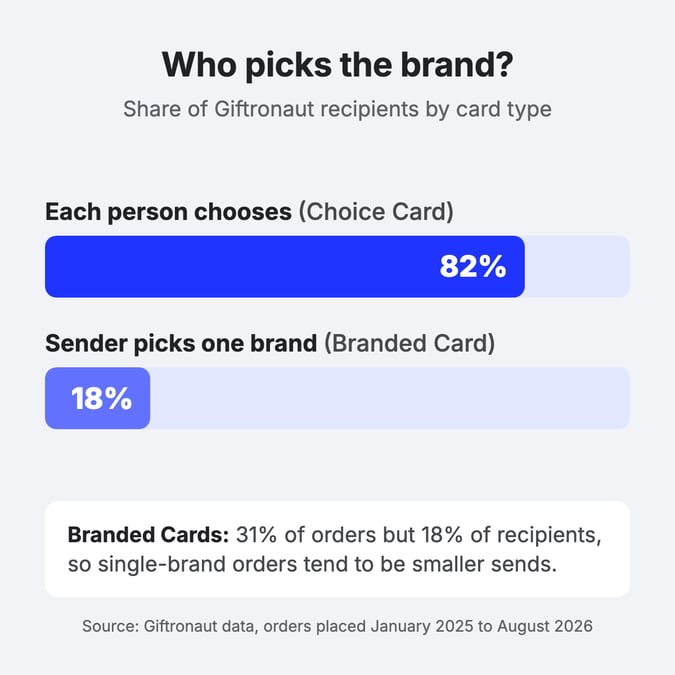
Giftronaut’s own sending data points the same way. Rewards where recipients choose their own brand account for 82% of Giftronaut recipients. Branded Cards, where the sender picks the brand, make up 31% of orders but only 18% of recipients (Giftronaut data, orders placed January 2025 to August 2026). That pattern suggests single-brand orders are mostly smaller, targeted sends.
| One brand (Branded Gift Card) | Each coworker chooses (Choice Card) | |
|---|---|---|
| Who picks the brand | You, when you place the order | Each coworker, when they redeem |
| Best for | A team that already agrees on one shop | A mixed team, or anyone you’re unsure about |
| Coworkers abroad | You need the card issued for their country | They pick their country and currency |
| Once it’s opened | The brand can’t be swapped after the code is shown | They can split the amount across brands, then it’s final |
Country is where single-brand orders usually go wrong. Giftronaut gift cards are country-specific and can’t be redeemed in another country, even when the same brand exists there, so an Amazon.co.uk card won’t work on Amazon.com. With a Choice Card, you don’t need to know where anyone lives: each coworker selects their country when they redeem and picks from 4,300+ brands across 225 countries.
If the thank-you has a theme, like lunch on the team, you can narrow a Choice Card’s catalog to certain categories, countries or brands when you set up the order. Your coworkers then see only the brands you’ve kept.
How much should you budget per coworker?
Your budget per coworker is the amount each person gets, and the order total is that amount times the number of people on the list. Agree on the per-person amount with whoever owns the budget first, then count heads, because the list tends to grow by one or two before you send.
How much to give depends on the occasion and on what your office already does, and our guide to gift cards for coworkers suggests amounts by occasion.
Take a 12-person team at $20 a head:
| Line | How it’s worked out | Amount |
|---|---|---|
| Cards | 12 coworkers × $20 | $240 |
| Funded by ACH or wire | No funding fee | $240 |
| Funded by credit card | 3% processing fee on the $240 you add | $247.20 ($240 plus a $7.20 fee) |
Giftronaut charges no platform or per-card fees, so the funding method is the only thing that moves the total. Paying from your own pocket? A personal card works too, at the same 3% fee. Small teams should know two limits. The minimum deposit is $100, so five coworkers at $20 each just reach it, and a smaller order leaves the rest of the deposit in your balance for next time. The amount also has to fit the card. Every gift card has its own minimum and maximum, and about 86% of Giftronaut products take whole-number amounts only, so $25.50 can’t be ordered on those. Your account is funded in US dollars, while Choice Card recipients redeem in their local currency.
If the money comes from a company or team budget rather than your own pocket, check one more thing. For employees, gift cards paid for by the employer are taxable wages however small: the IRS says gift cards are never excludable as a de minimis benefit (IRS Publication 15-B, 2026). Tell payroll who is getting what before the order goes out.
How do you upload the coworker list and send the order?
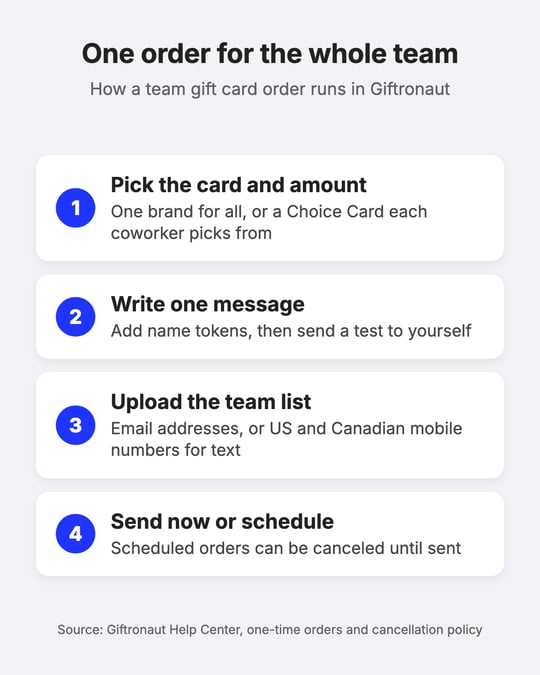
The coworker list goes in as a spreadsheet inside a Giftronaut one-time order. One file takes the whole team, and you can give each coworker a different amount if you need to. The order runs in four steps, and the list is the one most worth a second look.
- Choose the card and amount. In your dashboard, select Place an Order, then One-Time Order, and pick a Choice Card or a Branded Gift Card. For a Branded Gift Card you also choose the country. Enter the amount each coworker gets.
- Write the message. Add a subject line and a short message. If you use name tokens for first or last names, your spreadsheet needs those columns. Then send a test email to yourself or a teammate: the card in it is a sample that can’t be redeemed, and attachments don’t come through in the test.
- Upload the team list. Choose the spreadsheet upload instead of typing names one by one. Give each coworker an email address, or a US or Canadian mobile number if you’re sending by text. Turn on different amounts here if not everyone gets the same. Then fix any flagged rows: special characters or numbers in name fields, and email typos like “,com” instead of “.com”.
- Send now or schedule. Choose Send now, or a date and time. Review the order summary (card type, amounts, template and recipients), then click Send and Confirm.
A team message works best when it names the thing the whole team did. “Thanks for getting the spring release out a week early. Pick something you’ll actually enjoy” lands better than “Thanks for all your hard work!” With a name token at the top, each coworker still sees their own first name.
Check the list against the team’s actual roster before you upload, not against who came to the last meeting. The people who weren’t in the room are the easiest ones to leave off.
Should you send the cards by email, text or a reward link?
Email suits most team orders, text suits coworkers who read their phone before their inbox, and a reward link fits when you’d rather deliver each card through your own channel. Pick the channel each coworker actually reads first.
| Channel | Fits | What to know |
|---|---|---|
| Most teams, in any country | Work filters can hold it, so ask IT to allowlist no-reply@giftronaut.com and the giftronaut.com domain | |
| Text (SMS) | Coworkers without a desk inbox | US and Canadian mobile numbers only, at no extra cost |
| Reward link | Sending through your own email or chat | Turned on for your account by your account rep or Giftronaut support first; each link is one card, and the order can’t be canceled once placed |
If part of the team lives outside the US and Canada, those coworkers get their cards by email or by link. For the delivery details of each channel, including what to do when a card goes missing, see our guide on how to send an e-gift card.
When should you fund and schedule the order?
Fund your Giftronaut account before the day the cards should land, because every order is prepaid and the money has to be in your balance when you place it. Giftronaut’s funding guide gives the timings: a credit card deposit is available almost instantly during US business hours (up to 1 business day otherwise, or 2 if extra verification is needed). ACH typically takes 2 to 3 business days and wire 1 business day, counted from the day your bank sends the payment. On a new business account, the first deposit is also held while the business is verified, and most reviews finish within one business day.
Then schedule the order for the morning it should arrive. Only about one in nine Giftronaut orders (11.6%) is scheduled in advance (Giftronaut data, September 2026), which is fine for a spontaneous thank-you. For the end of a project or the first morning of an offsite, a scheduled order means nobody has to remember at 8 a.m.
Scheduling also gives you room to fix mistakes. A scheduled order can be canceled until it’s sent, but once a Giftronaut order is fulfilled, it can’t be canceled, returned, exchanged or refunded.
What happens after the cards go out?
After the cards go out, each coworker’s line in the order shows whether their email was sent or bounced. You can correct a wrong address and resend the same card at no extra charge. Only the sender can change the address a card went to, so when a coworker says theirs never came, the fix starts with whoever placed the order.
Coworkers don’t need an account to redeem, as Giftronaut’s guide to what recipients see shows. They open the email or text, confirm it’s them with a one-time code sent the same way, and choose their card. The code is valid for 10 minutes, and they can request a new one.
Sent means the coworker’s mail server accepted the email, so ask them to check spam and work filters. Bounced means the address is invalid or blocked: correct it before you resend, because several resends in quick succession can trip spam filters. A Redeemed Date shows only on orders placed with the Refund Option.
Rewards stay redeemable for 180 days by default. The Refund Option, chosen when you place the order, shortens that window to 30, 60 or 90 days. When it closes, 50%, 40% or 30% of the value of fully unredeemed cards comes back to your balance. Our guide to preparing a bulk gift card list and delivery goes further into bounces and resends.
Start with the team list, not the card
These days, I ask for the amount per person, never the total, and I count heads on the morning I place the order. It makes for a duller approval email, which is the whole idea.
Before you order, write down three things: who’s on the team (remote people included), the amount per person the budget owner has approved, and the morning the cards should arrive. Fund the account a few days ahead if the money is coming by bank transfer, then schedule the order for that morning.
Frequently Asked Questions
How do I send gift cards to coworkers who don’t check work email?
Send by text if they have a US or Canadian mobile number, which costs nothing extra on Giftronaut. Otherwise, use a personal email address they read, or a reward link you deliver yourself once that feature is turned on for your account.
Is it cheaper to buy gift cards in bulk?
Budget at face value. Giftronaut users only pay face value when they send gift cards, with no platform or per-card fees. The one fee on a standard order is 3% when you fund by credit card.
How many coworkers can one gift card order include?
As many as you need. Giftronaut sets no limit on the number of rewards in one order, so a small team and a whole department use the same spreadsheet upload.
Can coworkers in other countries get their cards from the same order?
Yes, with a Choice Card. Each coworker picks their country and currency when they redeem, because Giftronaut gift cards only work in the country they were issued for. Text reaches US and Canadian numbers only, so email the rest.
Do coworkers need an account to redeem their gift card?
No. Coworkers open the email or text, confirm it’s them with a one-time code sent the same way, and redeem. The code is valid for 10 minutes, and they can request a new one.
Can I cancel a bulk gift card order after it’s sent?
No. Once a Giftronaut order is fulfilled, it can’t be canceled, returned, exchanged or refunded. A scheduled order can still be canceled until it’s sent.