You can buy a Dunkin’ Donuts gift card at participating Dunkin’ restaurants, in the Dunkin’ app, on dunkindonuts.com and at retail stores across the US. To pay with it from your phone, add it in the app under Add/Manage Cards with the card number and PIN, then check the balance online, in the app, by phone or at the counter.
At a previous job, my end-of-year thank-you came as a coffee gift card in a small envelope, and I put it in my wallet “for a bad Monday.” I pay for nearly everything with my phone, so the wallet mostly rides along in my bag. In March, the teammate behind me in the coffee line watched me tap my phone and asked, “Didn’t you get the same card? Mine’s been buying my coffee since January.” Mine was still in its envelope.
A plastic gift card only gets spent if it lives where you already pay. For a Dunkin’ card, that usually means the Dunkin’ app, and getting it there takes two numbers from the back of the card and one menu you may never have opened. Here’s where to buy a card, how to add it, how to check what’s left and what changes when the card came from work as a link.
Where can you buy a Dunkin’ Donuts gift card?
A Dunkin’ Donuts gift card is sold at participating Dunkin’ restaurants in the US, in the Dunkin’ app, on Dunkin’s gift card page and at thousands of retail stores nationwide. Dunkin’s gift card FAQ names CVS Pharmacy, Walgreens, Target, Walmart and BJ’s Wholesale Club among the retailers that carry them.
Where you buy decides what kind of card you end up holding:
| Where you buy | What you get | Good to know |
|---|---|---|
| A Dunkin’ restaurant | A plastic card, loaded at the counter | Participating US locations |
| The Dunkin’ app | A virtual card | It works only inside the Dunkin’ app; no plastic card arrives |
| dunkindonuts.com | An eGift sent by email or text, or a card in the mail | The gift card page offers both |
| A retail store | A plastic card from the gift card rack | Stock differs from store to store |
If you’re buying one card as a gift, the eGift is the quickest route, because the recipient can add it straight to their app. If you want something to hand over in person, a restaurant or a store rack works fine. In Canada, Dunkin’ points buyers to participating Canadian Dunkin’ restaurants instead.
Buying for a whole team rather than one person is a different job. Our guide to buying Dunkin’ gift cards in bulk covers that, and so does our page on how to buy gift cards in bulk across brands.
How do you add a Dunkin’ gift card to the app?
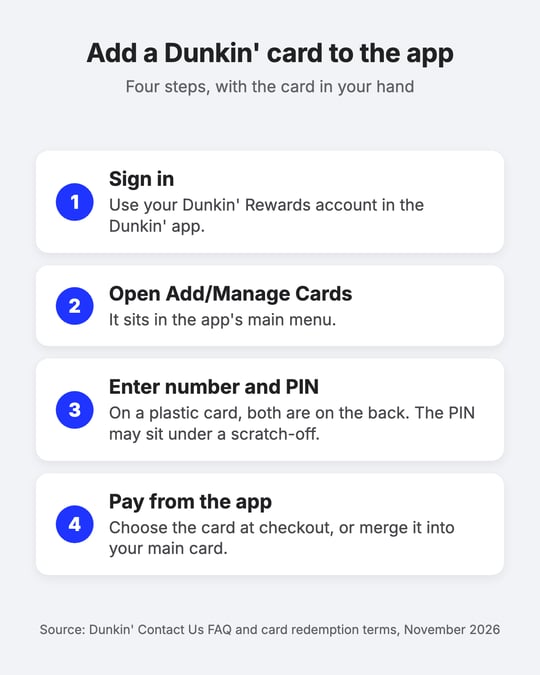
You add a Dunkin’ gift card to the Dunkin’ app from the Add/Manage Cards screen in the app’s main menu, using the card number and PIN. Signing in comes first, because cards are saved to your Dunkin’ Rewards account.
- Sign in to the Dunkin’ app with your Dunkin’ Rewards account.
- Open the main menu and choose Add/Manage Cards.
- Enter the card number and PIN. On a plastic card, both are printed on the back, and the PIN may sit under a scratch-off sticker. On an eGift, use the card details from the email or text.
- Pay with it. Choose the card as your payment method at checkout in the app, or show it at the counter.
Adding the card is optional, since Dunkin’ accepts a card you never register. It’s still worth the minute, for two reasons. A registered card earns Dunkin’ Rewards points when you pay with it. And if a registered card goes missing, Dunkin’ can freeze the balance and move it to a new card, while an unregistered card has to be treated like cash.
Got two or three cards from different people? You can merge them. In Add/Manage Cards, scroll to My Additional Cards, pick the card, tap Merge Balance to Primary and confirm. The card you merged from is removed from your account, and its balance now sits on your main card.
If the card won’t add
Check the number and PIN against the card or the original message first, since one wrong digit is enough to stop it. If the back of your card has no PIN at all, the Dunkin’ Contact Us page says to call the Loyalty Support Team at 1-800-447-0013. A card bought inside the app doesn’t need adding at all: it’s already there as a virtual card.
How do you check a Dunkin’ gift card balance?
You can check a Dunkin’ gift card balance four ways: on Dunkin’s gift card page with the card number and PIN, in the app, by calling 800-447-0013 and choosing option 2, or by asking at a Dunkin’ counter. Pick whichever is closest to hand.
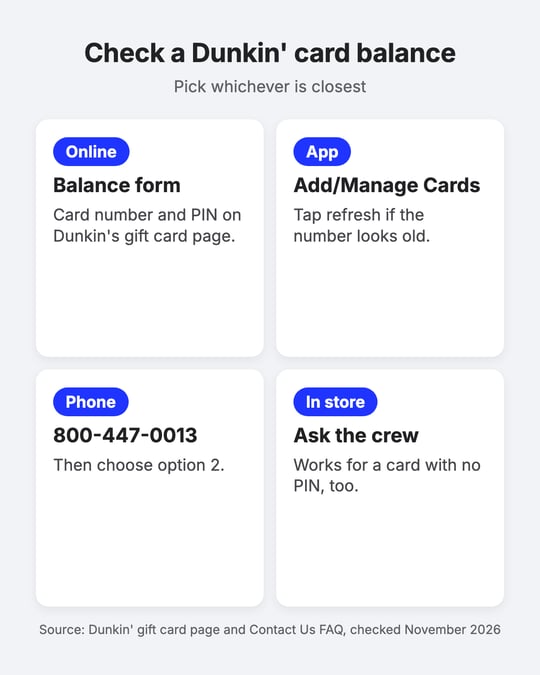
- Online. The balance form on Dunkin’s gift card page asks for the card number (16 or 19 digits, no spaces) and the PIN.
- In the app. Registered cards show their balance under Add/Manage Cards. If the number looks out of date after a purchase, select the card and tap the refresh button next to the balance.
- By phone. Call 800-447-0013 and choose option 2.
- At the counter. Your balance is printed at the bottom of every Dunkin’ receipt, and any crew member can look it up for you with no purchase required.
A card with no PIN can’t use the online form. For that one, Dunkin’s gift card page says to visit a Dunkin’ location to check the balance.
How do you pay with a Dunkin’ gift card?
A Dunkin’ gift card pays for food and drinks at participating Dunkin’ restaurants in the US, up to the balance on the card. Hand the plastic card over at the counter, show the eGift code on your phone, or choose the card at checkout once it’s in your app.
The card’s terms set a few limits. It can’t be used to buy other gift cards, and it can’t be turned into cash unless the law requires it. Dunkin’s eGift redemption terms add that the card can’t be applied to third-party delivery orders, which matters if you mostly order Dunkin’ through a delivery app (more on that in the FAQ below).
Whatever’s left after a purchase stays on the card for your next visit.
How does a Dunkin’ eGift card work?
A Dunkin’ eGift card is a digital Dunkin’ card that someone sends you by email or text from dunkindonuts.com or the Dunkin’ app. You open the message, then add the card number and PIN to your Dunkin’ app or show the code at the counter.
A few details from Dunkin’s terms of use matter to the person sending one. Standard text message rates apply to both the sender and the recipient when the card goes by text. The sender is responsible for getting the email address or phone number right. And once the eGift has been received, it can’t be returned or canceled.
If your Dunkin’ card came from work
A Dunkin’ card from work often arrives as a link from a rewards platform rather than straight from Dunkin’. Giftronaut, for example, sends Dunkin’ gift cards by email, SMS (text message, to US and Canadian mobile numbers) or reward link. The email comes from no-reply@giftronaut.com: you click the link, confirm it’s you with a one-time code and the redemption page shows your card. From there, the steps above apply.
Two snags come up with work cards. Company email filters commonly hold reward emails, so if yours never showed up, ask your IT team to allowlist no-reply@giftronaut.com and the giftronaut.com domain. And only the person who sent the reward can change the address and resend it, so if it went to an old inbox, tell the sender rather than support.
Put the card where you already pay
These days, any gift card that lands on my desk goes into its app before I write the thank-you note. The envelope from that March went into recycling, and the card covered a run of Mondays, only some of them bad.
If a Dunkin’ card is sitting in your wallet or inbox right now, take two minutes today. Add it under Add/Manage Cards, check that the balance shows, and keep the card or message until it’s registered.
Frequently Asked Questions
Do Dunkin’ Donuts gift cards expire?
No. Dunkin’ says its gift cards never expire or lose value, and the card terms add that there are no fees. A reward link from work is separate: on Giftronaut, a reward stays redeemable for 180 days by default, so open the link soon.
Can you use a Dunkin’ gift card on DoorDash?
No. Dunkin’s eGift redemption terms say the card can’t be applied to third-party delivery orders, and Dunkin’ delivery runs through DoorDash, Uber Eats and Grubhub. For delivery, the app’s own gift card is the one that works, such as an Uber Eats gift card.
What if my Dunkin’ card has no PIN?
Take it to a Dunkin’ location and ask a crew member for the balance, since the online balance form needs a PIN. If the back of the card has no PIN printed on it, Dunkin’s Loyalty Support Team can help at 1-800-447-0013.
What happens if you lose a Dunkin’ Donuts gift card?
A registered card can be recovered and an unregistered one can’t. For a registered card, Dunkin’ freezes the balance, transfers it and mails it to you. An unregistered card works like cash, and Dunkin’ can’t replace it if it’s lost or stolen.
Can you send a Dunkin’ eGift card by text?
Yes. Dunkin’s terms let you send a Dunkin’ card by email, by text message or through its app. Standard text message rates apply to both the sender and the recipient.
Do you need a Dunkin’ Rewards account to use a Dunkin’ gift card?
No. You can spend a Dunkin’ card at the counter without registering it. You do need to sign in to a Dunkin’ Rewards account to add the card to the app, earn points on it and protect its balance if it’s lost.