
PayPal and Venmo employee rewards work well when your team wants cash-style flexibility and every recipient can use the service, while gift cards fit when you want the full reward value to reach the employee with no redemption fee. Many programs offer both: a gift card catalog with PayPal or Venmo as one of the choices, and a clear rule on who pays the payout fee.
For a long time, I was firmly against cash-style rewards. A gift card felt like a gift. Money landing in an app felt like an expense refund with a nicer subject line. Then a colleague in finance asked one question in a planning meeting that I couldn’t answer: “Are we picking the reward for them, or for us?” I still have opinions about it. I just stopped calling cash the lazy option.
If you’re choosing between PayPal, Venmo and gift cards for your team, start with that question. Below: who can receive each option, what the payout fee does to a reward, how tax works, and how to offer both without surprises.
Can you send employee rewards to PayPal or Venmo?
A rewards platform can send an employee reward as a PayPal or Venmo payout, either as one choice inside a gift card catalog or as the reward itself. The catch is eligibility: the employee needs an account with the service, and each service only reaches certain countries.
On Giftronaut, these are called Payout Options. They let a recipient take the reward as cash through PayPal or Venmo, and they’re the one reward type on the platform that carries a redemption fee. You can offer them in two ways:
- Inside a Choice Card. Turn on Payout Options when you send a Choice Card, and each employee picks a gift card, a prepaid card, or a PayPal or Venmo payout where available.
- As a direct payout. Pick PayPal or Venmo from the Branded Card catalog and send it as the reward, so every recipient gets that payout.
Before you promise cash to anyone, check that they can receive it:
| PayPal International | Venmo | |
|---|---|---|
| Where it works | Recipients in PayPal’s listed countries | United States only |
| What the employee needs | A registered PayPal account email and name | A Venmo account and a verified mobile number |
| Currency | Funded in USD, converted at PayPal’s daily exchange rate | USD |
| Reward amounts | Only listed denominations; other amounts hide this option | USD 1 to 1,000 |
Employees don’t need a Giftronaut account to redeem, but they do need the PayPal or Venmo account. Payout Options are also enabled on request, so ask for them before you plan a campaign around them.

PayPal and Venmo vs gift cards: which fits your employees?
PayPal or Venmo fits employees who want cash-style freedom and live where those services work, while gift cards fit when you want no redemption fee and wider reach. Cash-style payouts carry a fee and only reach some countries. Gift cards carry no redemption fee and travel further, but they tie the reward to a brand, or to the employee’s pick from a catalog.
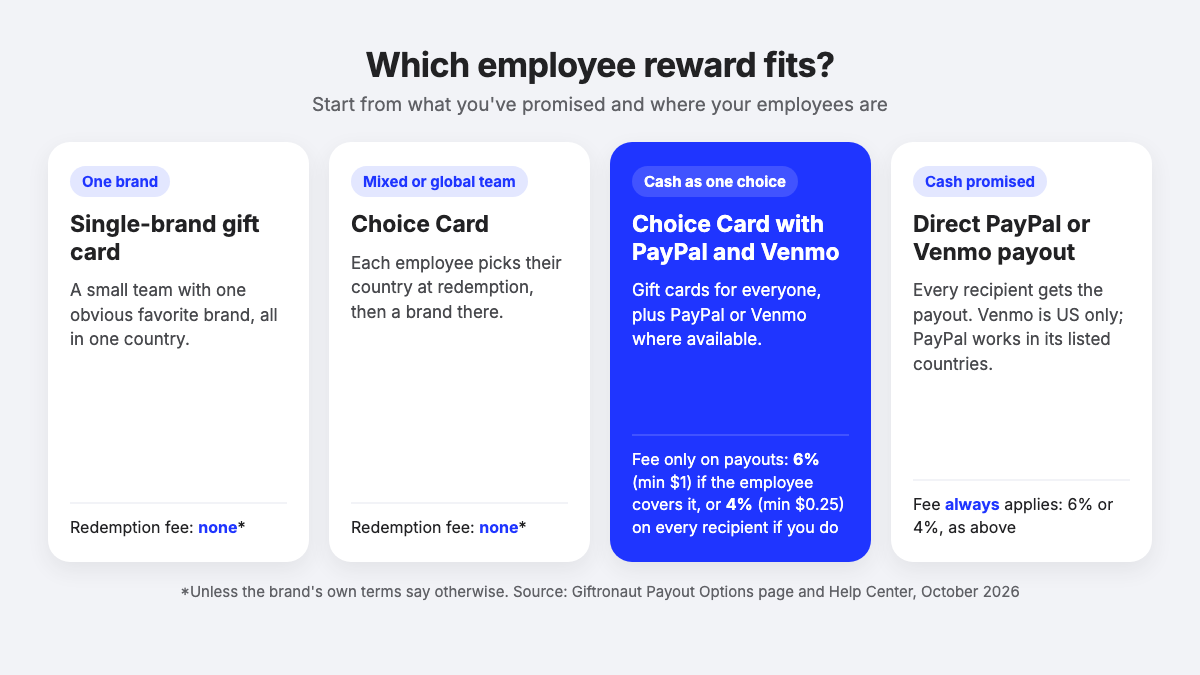
Gift cards and prepaid cards carry no redemption fee unless the brand’s or card’s own terms say otherwise, so the fee only comes up for payouts. Here’s how the five options compare:
- Single-brand gift card. The employee gets one brand you choose. It works in the country the card is issued for, and suits a small, known team with an obvious favorite brand.
- Choice Card. The employee picks from the catalog in their own country, from 4,300+ brands across 225 countries. It suits mixed or global teams.
- Choice Card with Payout Options. The employee picks a gift card, a prepaid card, or PayPal or Venmo where available. The fee applies only to payouts, and only to the person who picks one, unless you cover it. Gift cards work anywhere in the catalog and payouts where PayPal or Venmo works, so it suits teams that want choice and a cash-style option.
- Direct PayPal or Venmo payout. Cash lands in the employee’s PayPal or Venmo account. There is always a fee, paid by you or the employee. It works in PayPal’s listed countries, or the US for Venmo, and suits programs that have already promised cash.
- Prepaid card. A Visa or Mastercard card the employee can spend at many merchants. Where it works varies by card; the Global Visa Reward Card USD can be used in 225 countries. It suits cash-like spending without a PayPal or Venmo account.
A few rules of thumb:
- If your team is all in the US and people have asked for cash, a Choice Card with Payout Options gives them Venmo or PayPal without forcing it on anyone.
- If your team spans several countries, lead with a Choice Card. Gift cards are country-specific, but with a Choice Card each employee picks their country at redemption, so nobody gets a card they can’t use.
- If someone wants cash-like spending but has no PayPal or Venmo account, a prepaid card is the middle ground. Our comparison of digital gift cards and prepaid cards covers that trade-off in detail.
What does a PayPal or Venmo reward really cost?
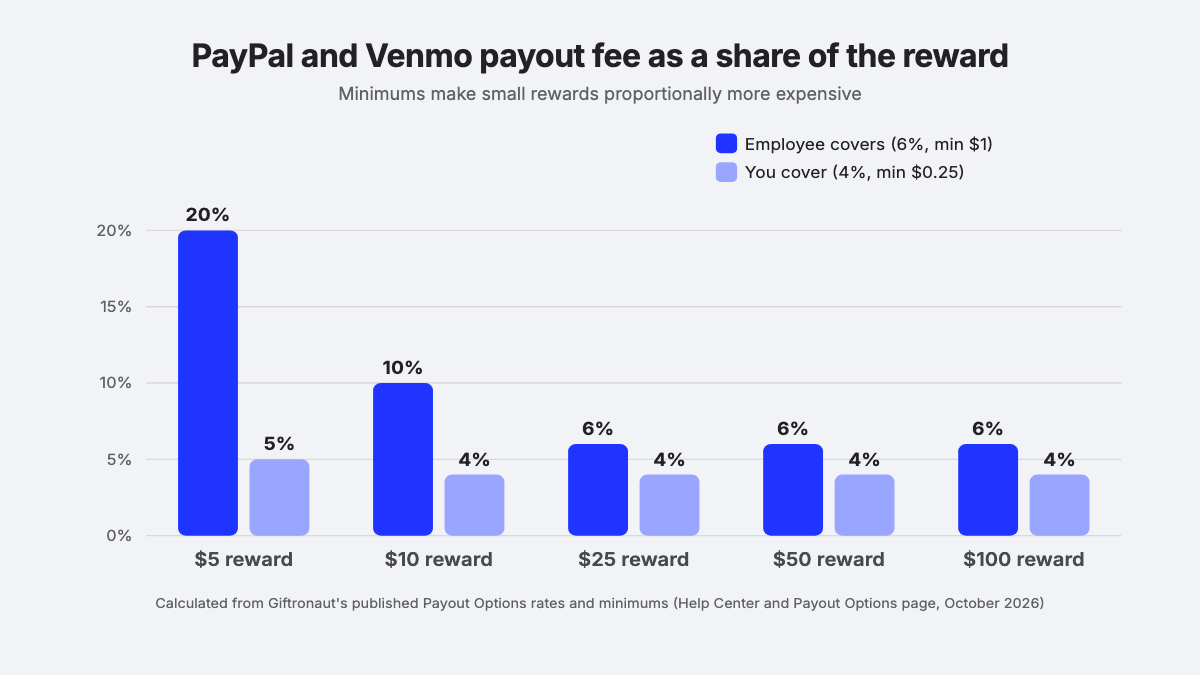
A PayPal or Venmo reward costs more than its face value, in one of two ways: either the employee receives a little less, or you pay a little more. On Giftronaut, the payout fee is 6% with a minimum of $1 per recipient when the employee covers it, and 4% with a minimum of $0.25 per recipient when you cover it. Employees cover it by default.
Here’s how that plays out on a $50 reward:
| Who covers the fee | You pay | The employee receives |
|---|---|---|
| The employee (default) | $50 | $47 ($50 minus the 6% fee) |
| You | $52 ($50 plus the 4% fee) | $50 |
The bigger catch sits inside the Choice Card. When you enable Payout Options and cover the fee, you pay it for every recipient in the order, including the ones who end up picking a regular gift card, because nobody knows at order time who will choose cash.
Say you send 40 employees a $50 Choice Card with Payout Options and cover the fee. That’s 40 x $2 = $80 in fees, whether five people pick PayPal or all 40 do (a hypothetical example). If only a handful usually choose cash, letting employees cover it costs you nothing, though each person who picks cash gets $47 instead of $50.
Minimums matter most on small rewards. A $10 payout loses $1 when the employee covers the fee, which is 10% of the reward, more than the headline rate.
If you’re still deciding which side should pay, our guide on who should cover payout fees in an employee recognition program walks through the policy choice, and the Help Center article on Payout Options has the full fee rules.
Are PayPal and Venmo employee rewards taxable?
PayPal and Venmo employee rewards are taxable in the US, and so are gift cards. The IRS’s Publication 15-B (2026) says cash and cash-equivalent fringe benefits, including gift cards, “no matter how little, are never excludable as a de minimis benefit.” So moving a reward from a gift card to PayPal or Venmo doesn’t change whether it’s taxable.
What it can change is how visible the reward feels as pay. A transfer into a wallet app looks a lot like a bonus, which is one more reason to decide your tax handling with payroll before launch rather than after. For the employer side of reporting, see our guide to whether gift cards are taxable income. This is general information, not tax advice, so check your own situation with your tax adviser.
How to set up PayPal and Venmo rewards, step by step
Setting up PayPal and Venmo rewards is mostly a matter of deciding things once, so managers don’t have to guess later. Here’s the order that keeps it clean:
- Decide what you’re promising. “A reward you can spend however you like” and “$50 in Venmo” are different promises. Write the one you mean into the program description.
- Map where your employees are. Venmo only works for US recipients. PayPal works in its listed countries. Everyone else needs a gift card or prepaid card, which a Choice Card handles on its own.
- Pick the route. Use a Choice Card with Payout Options when cash should be one choice among many. Use a direct payout only when the program has already promised cash.
- Decide who covers the fee. Employees cover it by default. To cover it yourself, ask support@giftronaut.com to turn on the sender-covers option, and budget for it on every recipient.
- Check the amounts. Venmo payouts run from USD 1 to 1,000, and PayPal only offers its listed denominations. Other amounts hide the option.
- Fund the account. ACH and wire deposits are free; credit card deposits carry a 3% processing fee.
- Test it on yourself. Redeem one reward all the way to the payout, so you see what an employee sees.
- Write the fee rule into your policy. One sentence: who pays the payout fee, and what the employee receives if they pick cash.
If you’re still choosing between reward types for the wider program, our guide on how to choose employee recognition gift cards covers budgets, brands and occasions.
How Giftronaut handles PayPal and Venmo rewards
Giftronaut handles PayPal and Venmo rewards through Payout Options, which let you add cash to a rewards program without running a separate payout process.
- Cash as a choice or as the reward. Add PayPal and Venmo to a Choice Card, or send a payout directly from the Branded Card catalog.
- A catalog for everyone else. Employees who can’t use PayPal or Venmo, or who’d rather not, pick from 4,300+ brands across 225 countries, with no redemption fee on gift cards and prepaid cards unless the brand’s own terms say otherwise.
- Delivery your way. Rewards go out by email, SMS (US and Canadian mobile numbers) or reward link, right away or on a date you schedule.
- Bulk and automated sending. Upload a spreadsheet to reward a whole team at once, or trigger rewards through our Gift Card API and Zapier integrations.
Let employees choose, and decide who pays for the choice
The simplest setup for most teams is a Choice Card with PayPal and Venmo switched on, the default fee rule (employees cover it), and one sentence in your policy saying so. You get cash for the people who want it, gift cards for everyone else, and no fee on rewards nobody cashed out.
I still think a gift card says thank you a little louder than a transfer does. But when a team asks me which one to send now, I hand the question back to them, the way my finance colleague did to me.

Frequently Asked Questions
Can employees choose between PayPal, Venmo and a gift card?
Yes. When you send a Giftronaut Choice Card with Payout Options turned on, each employee picks a gift card, a prepaid card, or a PayPal or Venmo payout where available. Employees who pick a gift card or prepaid card pay no redemption fee unless the brand’s own terms say otherwise.
Can employees outside the US receive Venmo rewards?
No. Venmo payouts work for recipients in the United States only, in USD. Employees in other countries can receive PayPal in PayPal’s listed countries, or pick a gift card or prepaid card from their own country’s catalog with a Choice Card.
Who pays the fee on a PayPal or Venmo employee reward?
The employee does by default. On Giftronaut the payout fee is 6% with a $1 minimum when the recipient covers it, or 4% with a $0.25 minimum when the sender covers it. The sender-covers option is turned on by contacting support@giftronaut.com.
Why does the sender pay the payout fee for employees who pick a gift card?
Because when you cover the fee on a Choice Card with Payout Options, it’s charged for every recipient at order time. Nobody knows in advance who will choose cash, so the fee covers that flexibility for the whole order, and every employee still receives the full reward amount.
What’s the most you can send as a Venmo employee reward?
On Giftronaut, a Venmo payout can be from USD 1 to 1,000. PayPal payouts only come in PayPal’s listed denominations, and a reward amount outside those limits hides that option from the employee, who can still pick a gift card.
Do employees need an account to receive a PayPal or Venmo reward?
They need a PayPal or Venmo account, but not a Giftronaut account. PayPal payouts need a registered PayPal account email and name, and Venmo payouts need a Venmo account and a verified mobile number.