To send e-gift cards, pick the card and amount, add each recipient’s email address or a US or Canadian mobile number, and send right away or on a date you choose. One recipient can be typed in by hand, while a whole list goes in as a spreadsheet or as reward links you share through your own channels.
The last gift card I mailed went to a friend’s old apartment. I’d copied the address from a holiday card they sent two years earlier, and the envelope came back in January with a yellow sticker on the front. When I told my friend, they said, “You know you could have just texted it to me.” I didn’t have a good answer.
An e-gift card skips the envelope, but it still has to land in the right inbox or on the right phone. Whether you’re thanking one client or a whole department, the sending is quick. Delivery is where things go sideways: a wrong address, a spam folder, a phone number in the wrong country. If e-gift cards themselves are new to you, our guide to how e-gift cards work explains the basics first.
How do you send an e-gift card, step by step?
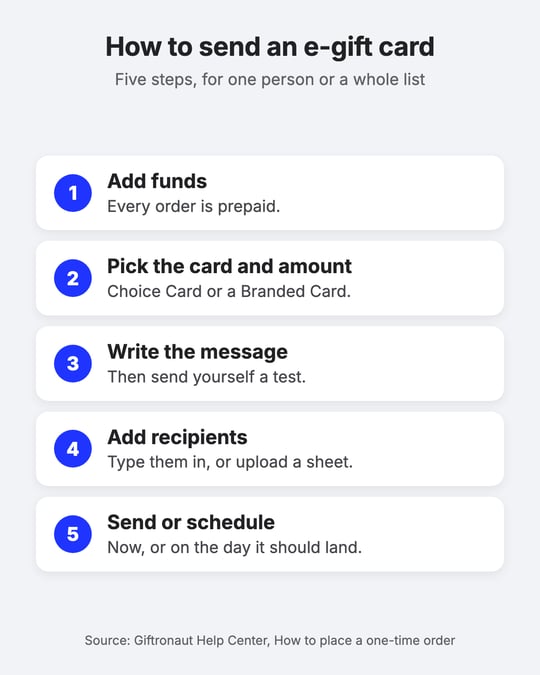
Sending an e-gift card from a business account takes five steps: add funds, pick the card and amount, write the message, add recipients, then send or schedule. On Giftronaut, every order is prepaid, so your balance has to cover the order before you can place it.
- Add funds. A credit card deposit is the fastest route, typically almost instant during US business hours, and it carries a 3% processing fee. ACH and wire carry no fee: ACH typically takes 2 to 3 business days and wire 1 business day, counted from the day your bank sends the payment. The minimum deposit is $100.
- Pick the card and the amount. A Choice Card lets the recipient pick the brand in their local currency when they redeem. A Branded Card is one brand you choose, for one country. Each product has its own minimum and maximum amount, and most need whole-number amounts, so $25.50 won’t go through on those.
- Write the message. Choose a brand template, add a subject line and a short message, and use personalization tokens to drop in each person’s first or last name. You can attach a PDF or image up to 5 MB. Then send yourself a test email, where the card is a sample that can’t be redeemed.
- Add recipients. Enter a handful of people one by one, or upload a spreadsheet for a longer list. The upload also lets you give each person a different amount.
- Send now or schedule it. Pick Send now or a date and time, check the order summary, then confirm. A scheduled order can still be canceled until it goes out, but once an order is fulfilled, it can’t be canceled or refunded.
The funding step is the one that catches people out. Take a 40-person team getting $25 each, a hypothetical $1,000 order. Paid by credit card, the processing fee adds $30. Funded by ACH a few days ahead, it adds nothing. New accounts have one more wrinkle: the first deposit is held while the business is verified, and most reviews finish within one business day.

How do you send an e-gift card by text?
Sending an e-gift card by text takes the recipient’s mobile number in place of an email address. Giftronaut sends Choice Cards and Branded Cards by text to US and Canadian mobile numbers at no extra cost, and the recipient confirms it’s them with a one-time code sent the same way.
For recipients in other countries, use email, or a reward link you send through your own SMS tool, CRM or chat app. Reward link downloads have to be switched on for your account first (your account rep or support@giftronaut.com can do it), and each order gives you a ZIP file with a CSV of one unique link per reward (downloading reward links walks through it). Treat those links as private: if one gets passed around, the first person to redeem it uses up the reward.
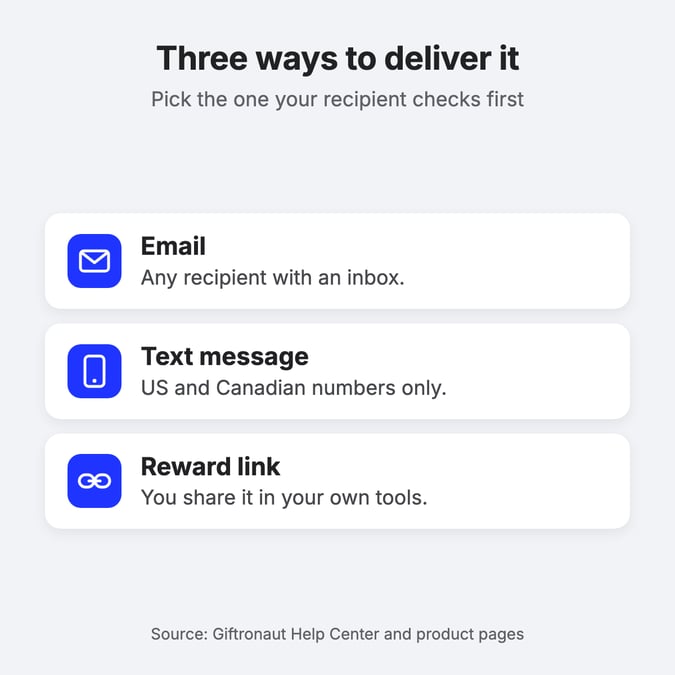
Not sure whether your team should get email or text? It usually comes down to which one people check first, and our guide to gift card platforms that support text and email delivery compares the two.
What’s the best way to send e-gift cards to a whole list?
To send e-gift cards to a whole list, place one order and upload a spreadsheet with one row per recipient. Each row can carry its own amount, and personalization tokens put each person’s name into the same message, so 200 people don’t need 200 checkouts.
Picture a sales team where the top three reps get $100 and everyone else gets $25. That’s one upload with two amounts in it, not two separate orders. The upload is also where most sending problems start, so clean the file before you submit it:
- Strip special characters from name fields. Commas, periods and question marks in a name can make a recipient invalid.
- Keep numbers out of names. A “Jordan 2” left over from a sign-up sheet can make the recipient invalid too.
- Check the email column. A typo like “,com” instead of “.com” is the classic one.
- Match your tokens to your columns. If the message uses a first-name token, every row needs a first name.
No addresses at all? Order reward links instead: you set the amount and the quantity, then share the links through a survey thank-you page, an event follow-up or any channel you already use. A reward link order can’t be canceled once it’s submitted, so check the quantity first.
For programs that buy in real volume, our bulk gift cards page covers ordering at scale.
What’s the best site to send an e-gift card from?
Which site to send an e-gift card from comes down to how many cards you’re sending, to whom and where. A brand’s own site is fine for one card of that brand to one person. For a list, several countries or recipients who should pick their own brand, a business gift card platform fits better.
If you’ve already settled on a brand, our guides to a virtual Amazon gift card and a virtual DoorDash gift card cover those routes. Otherwise, compare platforms on five things:
- Delivery: email, text and links, and whether you can schedule a send.
- Lists: a spreadsheet upload that allows a different amount per person.
- Tracking and resends: whether you can see each delivery and fix a wrong address after sending.
- Countries: whether recipients outside the US can redeem something they can use locally.
- The full cost: platform fees, payment-method fees and any fees the recipient pays.
Here’s how Giftronaut handles those five:
- Zero platform fees. Giftronaut users only pay face value when they send gift cards. Plan for the processing fee on credit card deposits and, only if you offer PayPal or Venmo through Payout Options, a Payout Options fee that recipients cover by default. Standard gift cards carry no redemption fee unless the brand’s own terms say otherwise.
- Email, text or reward link, on demand or scheduled. One-time orders come with real-time order, delivery and redemption tracking, and the sender can correct an address and resend.
- 4,300+ brands in 225 countries. Choice Card recipients pick from the brands available where they live.
For a longer checklist, see our guide to choosing a digital gift card platform.
Can you send an e-gift card to someone in another country?
You can send an e-gift card to someone in another country, as long as the card is issued for the country where they’ll spend it. Giftronaut gift cards are country-specific and can’t be redeemed in another country, even for the same brand: an Amazon.co.uk gift card won’t work on Amazon.com in the United States.
When you don’t know where someone will use it, send a Choice Card. The recipient selects their country when they redeem and chooses from the rewards available there, and our countries catalog shows what each country offers. Two more details help with international sends: texts don’t reach numbers outside the US and Canada, so use email or a reward link, and reward emails can be translated into any of 15 languages.
What should you do if an e-gift card doesn’t arrive?
When an e-gift card doesn’t arrive, check its delivery status first, then fix the address or resend it. In Giftronaut’s Order History, each recipient shows a status: Sent means the recipient’s mail server accepted the email, and Bounced means the address is invalid or blocked.
- Bounced: open the order, click the pencil icon next to the email address, enter the right one and confirm. The original link stays valid, but access follows the latest email you send.
- Sent, but not seen: ask the recipient to check spam, junk and Promotions, and to search for “Team Giftronaut” or your subject line. Corporate security filters often hold reward emails, and the fix is to ask their IT team to allowlist no-reply@giftronaut.com and the giftronaut.com domain.
- Lost after it arrived: select the recipient and click Resend. A resend doesn’t reduce your balance or cost anything extra, and it doesn’t restart the expiration window.
Only the original sender can change the address or resend, so recipients will come to you. Go easy on the Resend button, though: several resends in a short window can trip spam filters. The Help Center’s guide to resending and correcting emails has each screen.
Two habits prevent most of these messages. Tell people a reward is coming and which sender name to look for, so it doesn’t read like a scam. And keep reward links out of group chats and public pages. For more on safety, see our tips for sending e-gift cards securely.
Send a test card before the real one
These days, when I send a friend anything, I ask where it should go in the same message where I ask how they’re doing. My friend still brings up the yellow sticker every birthday.
If you’re sending e-gift cards this week, start small. Add funds, send yourself the test email, open it on your phone, and check that the message and the card look the way you meant. Then send the real order, now or on the day it should land.
Frequently Asked Questions
How do I send an online gift card to someone?
Choose the card and amount, add their email address or mobile number, and write a short message. Then send it or schedule it for later. On Giftronaut, texts reach US and Canadian numbers only.
How do I resend an e-gift card if the recipient loses it?
Open the order in Order History, select the recipient and click Resend. On Giftronaut, only the original sender can resend or change the address, and a resend costs nothing extra.
Is there a fee to send an e-gift card?
Giftronaut charges zero platform fees, so you pay the face value of each card. Credit card deposits carry a 3% processing fee, and Payout Options carry their own fee if you offer them.
What details do I need to send someone an electronic gift card?
Usually an email address, or a mobile number for US and Canadian recipients. A reward link needs no recipient details at order time, because you share the link yourself.
Can I schedule an e-gift card for a specific date?
Yes. Choose a date and time instead of sending now. A scheduled Giftronaut order can be canceled until it goes out, but a fulfilled order can’t be canceled or refunded.
Is it better to mail a gift card or send an e-gift card?
For most business sends, an e-gift card is easier to manage. You can see whether it was delivered and resend it to a corrected address, which a mailed envelope can’t offer.
Can I send e-gift cards to people in different countries in one order?
Yes, with a Choice Card. Each recipient selects their country when they redeem and picks from the rewards available there, because gift cards are country-specific.