

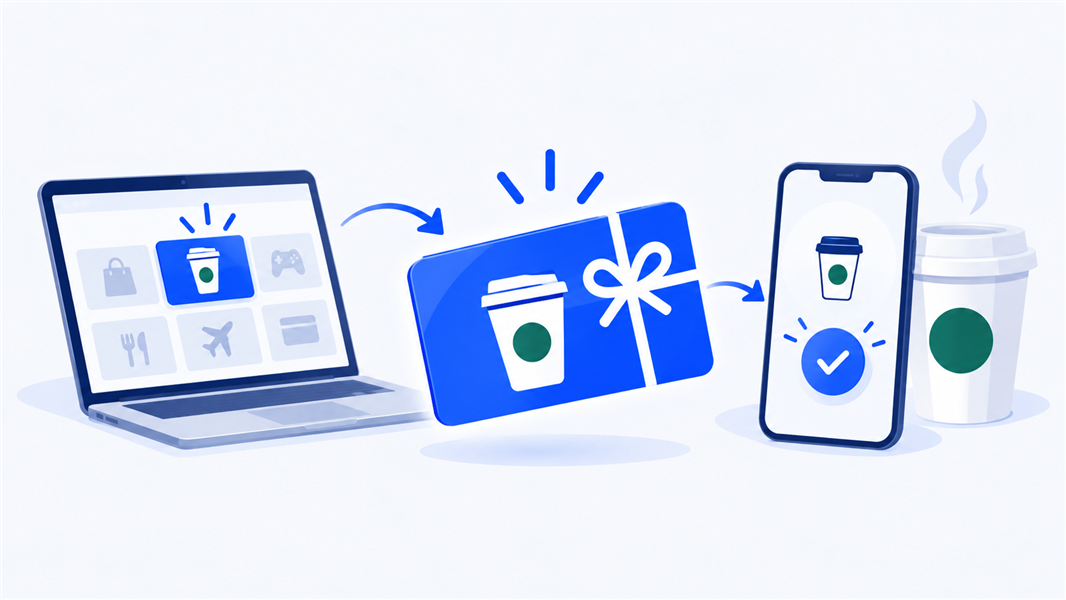
In today’s digital world, gifting has evolved to meet the demands of convenience and personalization. For coffee lovers, a virtual Starbucks gift card has become a go-to choice, offering flexibility, ease of use, and the joy of treating oneself to a favorite drink.
Whether you’re gifting to employees, clients, friends, or family, sending a Starbucks gift card virtually is an ideal way to show appreciation or celebrate special moments. Recipients who get a Starbucks gift card sent via text redeem it without an account.
TL;DR
- Recipients who get a Starbucks gift card sent via text redeem it without an account.
- Starbucks.com and the Starbucks app both deliver a virtual card by email or text, and you can schedule delivery for a future date.
- The official Starbucks site caps one order at 10 recipients, so larger corporate sends need a bulk platform.
- Giftronaut sends Starbucks gift cards to unlimited recipients from a single spreadsheet upload, with no service fee on top of face value.
Virtual Starbucks Gift Card: Why It’s the Perfect Gift

The beauty of a virtual Starbucks gift card lies in its universal appeal. Starbucks is an internationally recognized brand with a wide range of options for any palate, from coffee and tea to delicious pastries and snacks.
For businesses, it’s a simple yet impactful way to express gratitude, celebrate milestones, or boost morale.
Plus, digital gift cards are environmentally friendly, reducing waste from physical cards and packaging.
Virtual Starbucks Gift Card: Where To Buy

If you’re looking to buy a virtual Starbucks gift card, you have multiple options to choose from, ensuring a seamless purchase experience. Here’s where to find one:
Starbucks Website
- The Starbucks website is the most straightforward place to purchase a virtual Starbucks gift card. You can choose from various designs, add a personalized message, and select the amount.
Starbucks App
- For even greater convenience, you can use the Starbucks app to send a virtual gift card. Simply open the app, go to the “Gift” section, select your card design, and enter the recipient’s information.
- The Starbucks app also provides the added benefit of tracking your card balances and reward points, making it an ideal choice for existing Starbucks app users.
Third-Party Retailers
- If you’re interested in purchasing a Starbucks gift card along with other brands, several third-party retailers offer virtual Starbucks gift cards, such as Amazon, Walmart, and digital gift card platforms like Giftronaut.
- These options are especially useful if you’re planning to send multiple cards at once or want to explore various brands in addition to Starbucks.
How To Redeem a Virtual Starbucks Gift Card
Redeeming a virtual Starbucks gift card is a breeze. The process is designed to be as user-friendly as possible, whether you’re redeeming it at a store or online.
In-Store Redemption
You can redeem your virtual Starbucks gift card by simply showing the barcode or QR code on your mobile device to the cashier at any Starbucks location.
Online Redemption via the Starbucks App
The most convenient option for redemption is adding the gift card to a Starbucks account on the app.
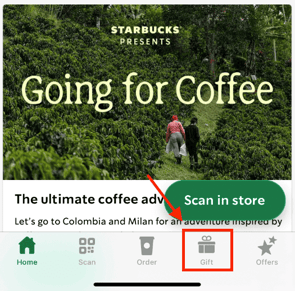
- Tap on the ‘Gift‘ tab at the bottom of the screen.
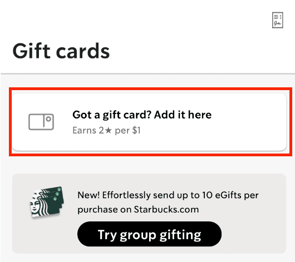
2. Tap ‘Got a gift card? Add it here’ at the top of the screen.
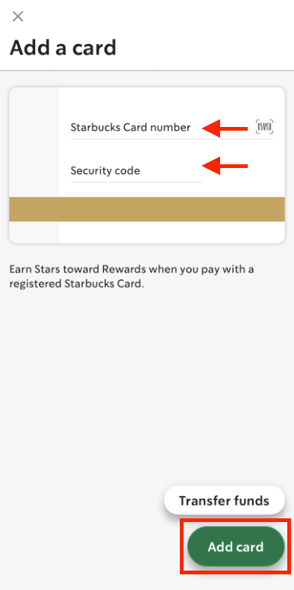
3. Enter the gift card number and the security code, and tap ‘Add Card.’
This option is particularly beneficial for frequent Starbucks customers. You can track your balance, earn Starbucks Rewards points, and reload the card whenever you like.
Transferring to a Physical Card
If you prefer a physical card, you can transfer the balance from the virtual Starbucks gift card to a physical Starbucks card.
This can be done easily at a Starbucks location or by linking the virtual card to a physical one in the Starbucks app.
Checking The Balance Of My Virtual Starbucks Gift Card
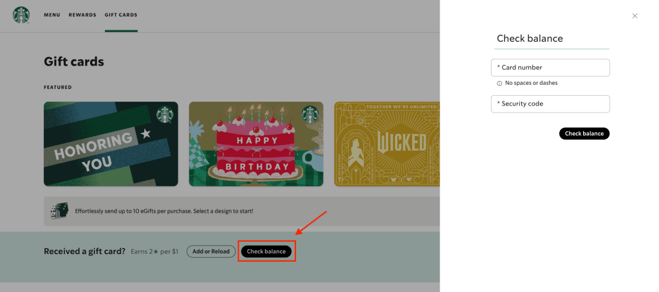
- Simply head over to https://www.starbucks.com/gift and click ‘Check Balance.’
- Enter your card number and the security code
Best Way to Send A Starbucks Gift Card
When it comes to sending a Starbucks gift card, the best option depends on your needs:
Directly from Starbucks

If you’re looking to send a single gift card or just a handful, you can do so directly through the Starbucks website.
The process is intuitive, allowing you to customize the card, add a message, and deliver it instantly. This option is ideal for individual gifts or smaller groups.
Bulk Sending for Corporate Gifting
For businesses, platforms like Giftronaut allow you to send Starbucks gift cards in bulk, streamlining corporate gifting. Starbucks.com caps a single order at 10 recipients, so larger corporate sends need a bulk platform: Giftronaut emails Starbucks gift cards to unlimited recipients from one spreadsheet upload, with no service fee on top of face value. See how bulk gift cards work.
You can personalize each card with company branding, add messages, and even track delivery for a fully managed experience.

FAQs
Can you send a Starbucks gift card via text?
Yes. The Starbucks app and website both deliver a virtual card by text message. The recipient taps the link and shows the barcode at any Starbucks.
Does the recipient need a Starbucks account to redeem a texted gift card?
No. Recipients can show the barcode from the text or email at the register. An account only adds balance tracking and Starbucks Rewards points.
How do I send Starbucks gift cards to more than 10 people?
Starbucks.com limits one order to 10 recipients. Giftronaut sends to unlimited recipients from one spreadsheet upload. Each person gets their own claim link.
Can you order physical Starbucks gift cards online?
Yes. Starbucks sells physical cards online for mailed delivery, which takes days. A virtual card arrives in minutes by text or email instead.
Is there a fee to send a virtual Starbucks gift card?
No. The recipient receives the full face value you paid. Giftronaut charges no service fee on top of the card amount.
Can I schedule a virtual Starbucks gift card for a future date?
Yes. Starbucks lets you pick a delivery date at checkout. This works well for birthdays and work anniversaries.
How do I check the balance of a virtual Starbucks gift card?
Go to starbucks.com/gift and select Check Balance. Enter the card number and security code. The app shows the same balance after you add the card.